Disclosure: As an Amazon Associate, I earn from qualifying purchases.
Are you trying to find a large-format scanner that can handle books, maps, and fragile documents without forcing you to cut corners?

Product overview
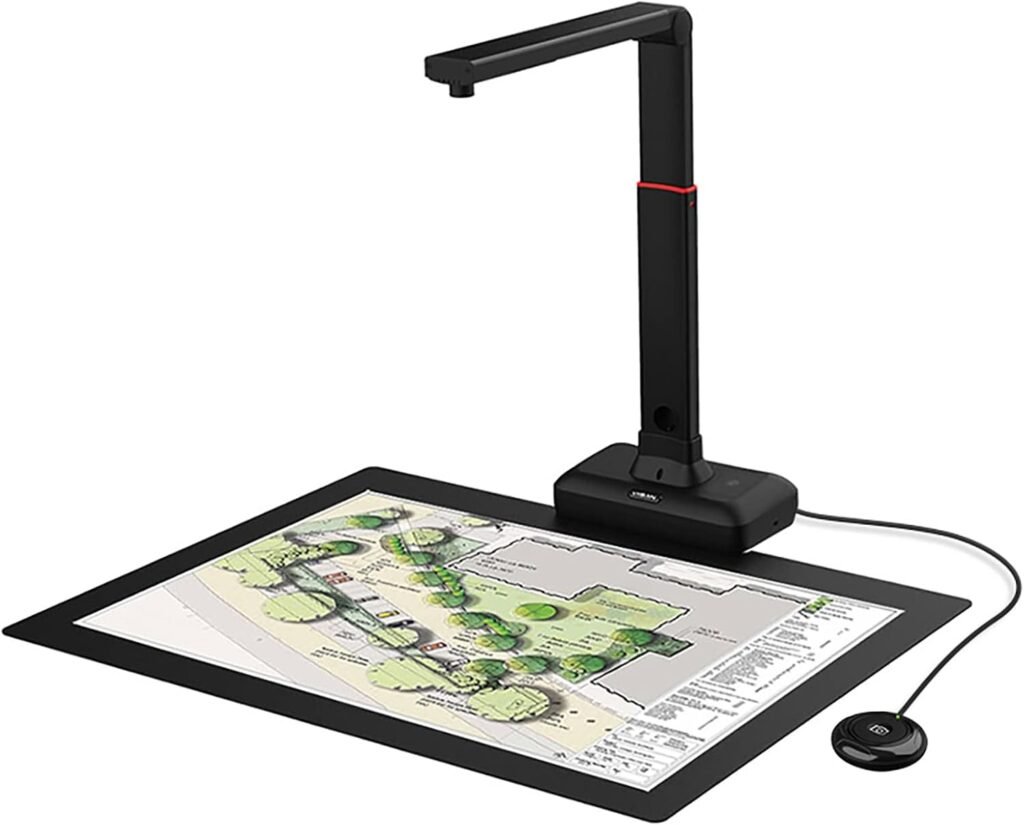
You’ll find that the VIISAN Large Format Book & Document Scanner S21 is aimed at users who need A2/A3 overhead scanning with smart software features. The unit combines a 26MP camera, adjustable height, and software-assisted image processing to make scanning bulky or fragile items easier for everyday and professional tasks.
What the product promises
The S21 promises A2 large-format capture (594 x 420 mm), automatic page flattening, fingerprint removal, and multi-language OCR to turn scans into searchable, editable documents. It also advertises software-enhanced resolution up to 600 DPI and compatibility with Windows and macOS PCs that use x64 or x86 processors.
Key specifications
This section summarizes the essential specifications so you can quickly see whether the S21 will fit your needs. Read through these specs to get a sense of the scanner’s physical limits and digital capabilities.
| Feature | Specification |
|---|---|
| Model | VIISAN S21 (Large Format Book & Document Scanner) |
| Capture Size | A2 (594 x 420 mm) / A3 adjustable |
| Camera Resolution | Up to 26MP (5888 × 4522 pixels) |
| Software-enhanced Resolution | Up to 600 DPI |
| Lighting | Built-in 3-level LED lamp |
| Special Software Features | Auto-flat (curved page correction), fingerprint removal, edge repair, automatic page splitting |
| OCR | Multi-language OCR; export to PDF, Word, Excel, Epub, Txt |
| Connectivity | USB (UVC/UAC compliant) |
| Compatibility Notice | Bundled OfficeCam supports x64/x86 on Windows and macOS; not compatible with ARM-based devices (e.g., Surface Pro X) |
| Use Cases | Books, manuscripts, newspapers, maps, snapshots, business cards, 3D objects, remote collaboration |
| Warranty & Support | 1-year warranty; tech support available |
| Packing List | S21 scanner, USB cable, scan pad, user guidance, manual button |
Design and build
The S21 uses a foldable, adjustable hinge that lets you switch between A2 and A3 scanning heights, which is helpful when you need flexibility. The build is designed for overhead scanning so you can capture books and delicate documents without pressing them flat.
Physical footprint and portability
The 90-degree foldable hinge reduces the scanner’s footprint for storage and travel, and the included USB cable keeps setup simple when you move between desks. You should expect a larger physical footprint while in use, especially when scanning A2 items, so plan your workspace accordingly.
Setup and installation
You can typically get the S21 up and running by plugging it into a compatible laptop or desktop and installing the bundled OfficeCam software. Follow the manufacturer’s step-by-step instructions and make sure you’re using a Windows or macOS machine with x64/x86 architecture for full functionality.
Software installation notes
OfficeCam only supports x64 and x86 Windows and macOS machines; ARM-based devices (like Surface Pro X) won’t be supported by the bundled scanning software. If you have an ARM device, you might still be able to use the scanner as a basic UVC camera in third-party conferencing apps, but the advanced scanning features from OfficeCam will not be available.

Scanning performance
Scanning performance depends on several factors: camera resolution, lighting conditions, object placement, and software processing. In real-world use, the S21’s high-resolution sensor and software enhancements combine to deliver detailed captures, especially for large-format pages.
Speed and throughput
For a single page or book spread, capture time is quick—the optical capture happens instantly, with additional software processing (flattening, fingerprint removal, OCR) taking a few extra seconds to a minute depending on complexity. If you’re batch-scanning many pages, factor in the processing time for OCR and post-processing, which can add up when you request high-quality outputs.
Image quality and resolution
The advertised 26MP (5888 × 4522) sensor can capture a lot of detail, and the software-enhanced output claims up to 600 DPI. You should expect crisp scans for printed text, high clarity for photographs, and useful detail for maps and diagrams when lighting and software settings are optimized.
Color accuracy and detail
Color fidelity is generally good for casual archival work and documentation, but if you require museum-grade color reproduction you may want to calibrate color profiles or use a dedicated photographic setup. For most academic, archival, and business uses you’ll find the S21 delivers images that are more than sufficient.
Software features and image processing
VIISAN’s bundled software is the heart of the S21 experience—this is where you get automatic page flattening, finger removal, edge repair, and automatic splitting of double-page images. These intelligent corrections are especially valuable when scanning bound books, fragile pages, or oversize newspapers.
Auto-flatten and artifact removal
Auto-flattening corrects curved pages by reconstructing the text layout for a flatter, easier-to-read output. Fingerprint removal and edge repair improve the aesthetics of scans, letting you produce clean documents from imperfect originals without manual retouching.
OCR and file output
Multi-language OCR lets you convert scanned images into searchable and editable files like PDF, Word, Excel, Epub, or TXT. The OCR accuracy depends on the clarity of the scan, language support, and the complexity of the layout, but for clear printed text it performs reliably.
Supported formats and workflows
You can export to commonly used formats for editing or archiving, which simplifies workflows if you plan to repurpose text for research or digital publishing. Remember that heavy OCR and format conversions may increase processing time, so batch jobs should be scheduled accordingly.
Lighting and capture conditions
The S21 includes a built-in high-brightness LED lamp with 3-level control so you can adjust illumination according to the scanned material. Proper lighting is crucial: avoid using the built-in LEDs under very bright external light, and be cautious with very glossy papers that may reflect and create glare.
Using the built-in LEDs effectively
Use the LEDs when ambient light is low to reduce shadows and ensure even exposure across large documents. When working under bright studio lights, you may want to turn off or dim the built-in LEDs to avoid competing light sources and reflections.
Book scanning specifics
If you scan books frequently, you’ll appreciate the overhead design, software flattening, and the foldable hinge that helps you position thick volumes comfortably. The automatic split function saves you the time of manually separating left and right pages into individual files.
Handling fragile and bound volumes
Because the S21 captures from above, you can scan delicate or tightly bound books without applying pressure that would damage the binding. The software’s correction tools further help preserve readability by fixing curves and worn edges in the output images.
Document and object scanning
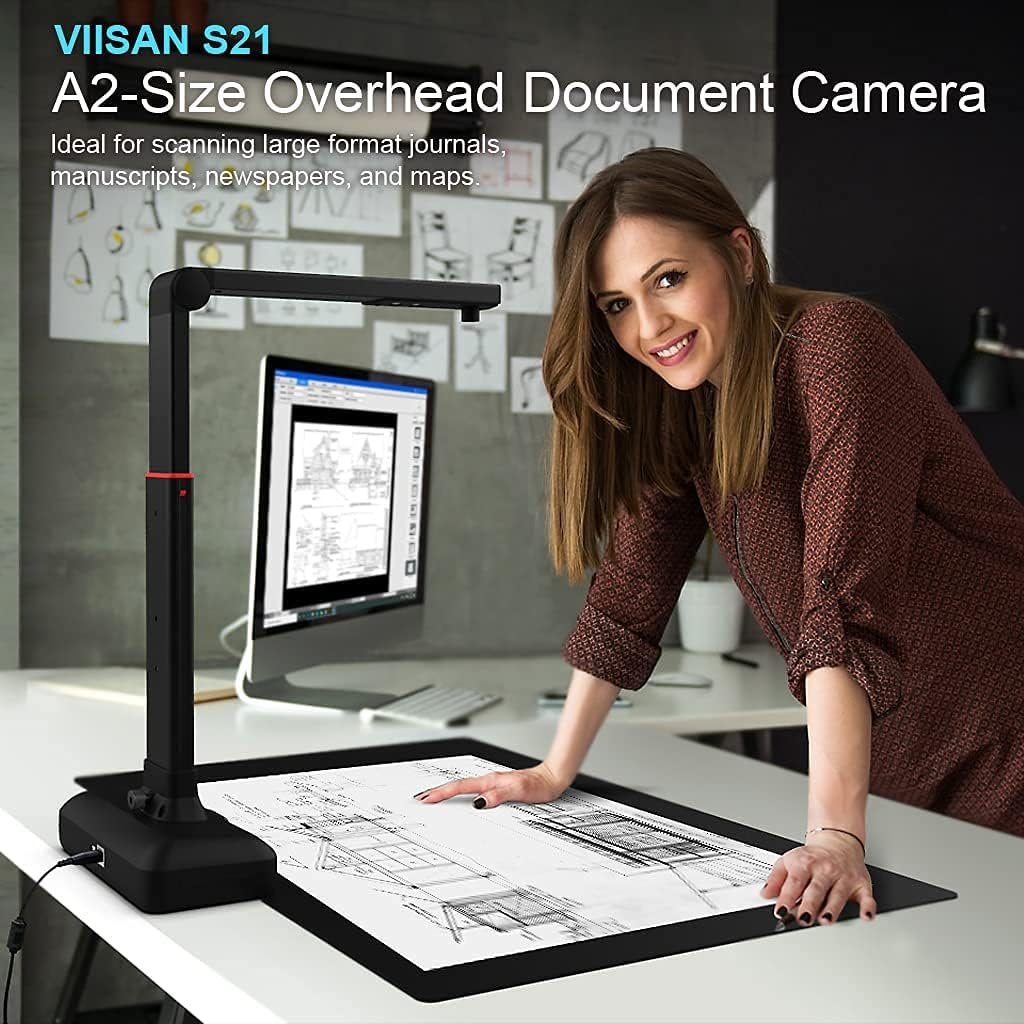
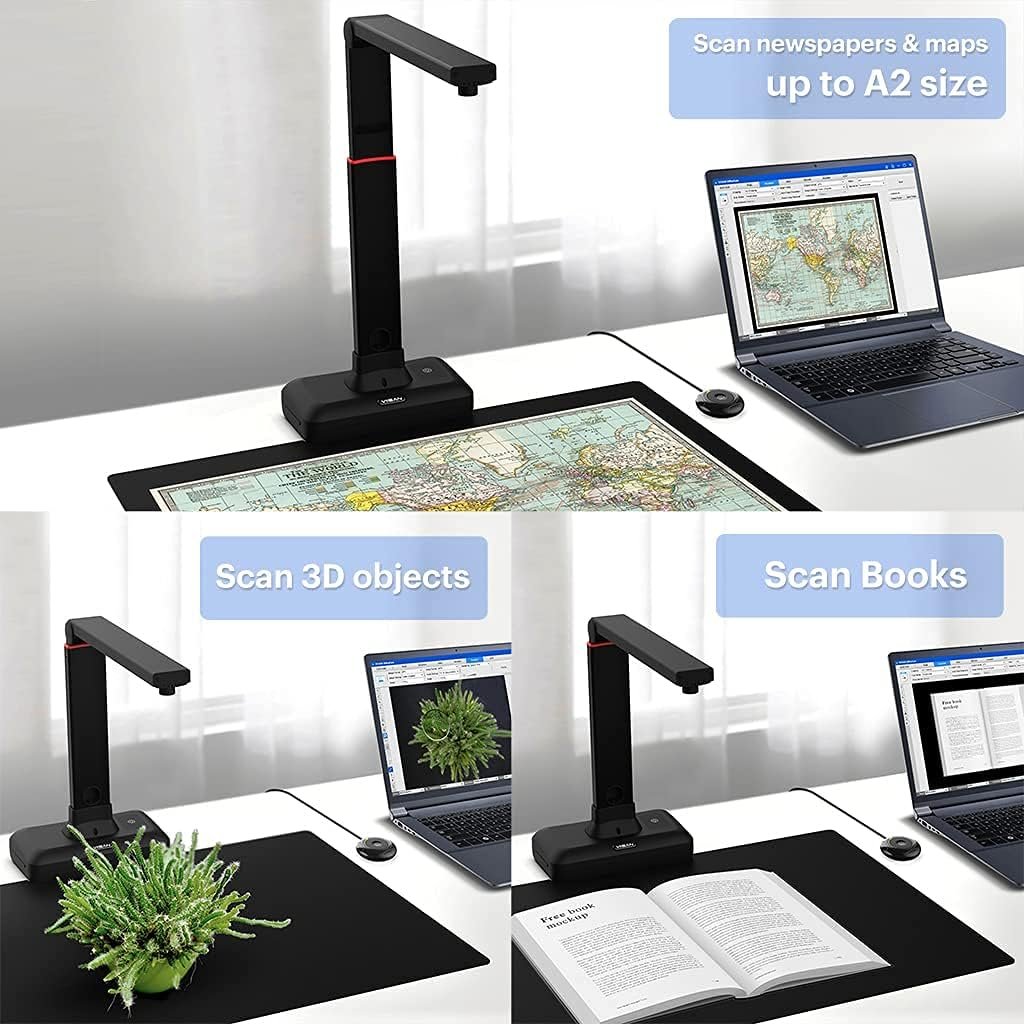
Beyond books, the S21 is versatile enough to capture business cards, photos, 3D objects, and maps, which is handy for museums, libraries, offices, and hobbyists. You can record video and use it for remote collaboration thanks to UVC compliance, making the device useful as a visual presenter as well.
Capturing 3D objects and business cards
For 3D objects, pay attention to depth of field and lighting to avoid soft focus or harsh shadows; moving the object within the capture area and adjusting LED levels will help. Business cards scan quickly and accurately, and OCR can extract contact info to speed up digital entry into address books.
Compatibility and connectivity
The S21 connects via USB and is UVC/UAC compliant so it can act as a video device for third-party conferencing apps. OfficeCam—the bundled software—supports x86 and x64 Windows and macOS, but not ARM-based systems, so check your hardware before purchasing.
What if you have an ARM device?
If you use an ARM-based laptop or tablet, you will likely be able to use the S21 as a simple camera in video conferencing apps, but you won’t get OfficeCam’s advanced scanning features on that device. For full scanning functionality you will need a compatible x64/x86 Windows or macOS machine.
Workflow and productivity tips
To get the most out of the S21, set up a dedicated scanning area with a stable table, good ambient light, and the included scan pad to help align pages. Create consistent naming and export rules in the software so your scanned files are organized immediately after capture.
Batch scanning and automation
If you plan to process many documents, use batch OCR and bulk export features to reduce manual workload. Invest time in learning the software’s presets and creating profiles for common capture tasks—this saves a lot of repetitive tweaking during extended scanning sessions.
Troubleshooting and common issues
Some common issues users may encounter include glare on glossy pages, incorrect OCR on poor-quality originals, and compatibility limitations with ARM-based systems. Most of these can be mitigated by adjusting lighting, increasing resolution, or using a compatible PC.
Quick fixes you can try
If you see glare, reduce the built-in LED level or adjust ambient lights and angle the material slightly to minimize reflections. If OCR is inaccurate, increase capture resolution or clean the source material if possible, and verify language settings in the OCR module.
Maintenance and care
Keep the scanner’s lens and LED area free of dust and fingerprints to preserve image quality, and store the unit folded to protect the hinge and camera when not in use. Follow manufacturer cleaning recommendations and avoid harsh solvents on optical elements.
Long-term care advice
Periodically check firmware and software updates from VIISAN to maintain compatibility and benefit from performance improvements. If you handle historical or fragile items regularly, consider using gloves and soft tools to reposition pages without leaving oils on materials.
Pros and cons
You’ll appreciate the large A2 capture area, high-resolution sensor, and the software’s useful correction tools, but you should also be aware of some limitations like ARM incompatibility and potential glare on glossy materials. Weigh these strengths and weaknesses in the context of your scanning needs to determine whether the S21 suits your workflow.
Quick summary of advantages and drawbacks
Advantages include A2/A3 flexibility, auto-flattening, fingerprint removal, multi-language OCR, and UVC compliance for remote collaboration. Drawbacks include the need for a compatible x64/x86 machine for full software functionality and the potential for reflection issues with glossy originals.
Recommended use cases
The S21 is ideal if you scan large journals, newspapers, maps, manuscripts, or bound books and require quick corrective processing to create readable digital files. It’s also useful for educators, archivists, small museums, and offices that need both document capture and remote visual presentation capabilities.
Who should consider this scanner
Choose the S21 if you need large-format capture and want intelligent image corrections out of the box, or if you frequently convert scanned text into editable formats via OCR. If you need museum-level color fidelity, ultrafine detail for high-end reproduction, or support for ARM-based laptops, you might need to consider alternatives.
Accessories and packing list
The package includes the S21 book scanner, a USB cable, a scan pad, user guidance, and a manual button to help with capture control. These items will get you started quickly and give you basic tools to align and control scans without additional purchases.
Optional add-ons to consider
You may want to add a dedicated desktop lamp with diffusers for larger color-critical projects, a calibrated color chart for color correction, or a stable copy stand for precise positioning. For high-volume scanning, a larger workspace and an external storage solution will improve your throughput and file management.
Alternatives and comparisons
If A2 capture and automatic correction are your priorities, the S21 competes well with other overhead scanners that offer page-flattening software, but you’ll find differences in price, software quality, and maximum resolution across brands. Compare models on capture area, OCR accuracy, and whether the software supports your computer’s architecture.
When to consider other models
If you rely on an ARM-based machine for all tasks, look for scanners that explicitly support ARM architectures or provide cloud-based scanning software compatible with ARM. If you require precise archival color reproduction or extremely high DPI for microfilm-level detail, consider dedicated flatbed scanners or professional overhead units with calibrated imaging pipelines.
Price vs. value
The S21 provides a compelling set of features for its price if your priorities are large-format capture, smart software processing, and versatility across document types. Consider the total cost of ownership including potential accessories, and whether your computer hardware meets software compatibility requirements.
Is it worth the investment?
If you’ll use its A2 capture, auto-flattening, and multi-language OCR on a regular basis, the S21 is likely worth the investment because it reduces manual post-processing time. If your needs are limited to occasional small-document scanning, a simpler and cheaper option might be more cost-effective.
Warranty and support
VIISAN covers the S21 with a 1-year warranty and provides a tech support team to help if you encounter issues. Keep your proof of purchase and contact information handy so you can access support quickly when you need it.
When to contact support
Contact support if you see hardware defects, connectivity problems, or if the bundled software fails to install on a supported machine. For compatibility questions, verify your OS architecture and system requirements before reaching out so you can give support accurate information.
Final verdict
If you need a large-format, overhead scanner with smart image correction and OCR features, the VIISAN S21 is a well-rounded choice that will simplify book scanning and large document digitization tasks. Its combination of a 26MP sensor, A2 capture size, intelligent software, and UVC compliance makes it versatile for both archival work and remote collaboration, provided you use it with a compatible x64/x86 Windows or macOS system.
Bottom-line recommendation
Buy the S21 if you frequently scan bound books, maps, newspapers, or other large-format materials and want automated corrections to speed up your workflow. If your setup is ARM-based or you need exceptional color accuracy for professional art reproduction, consider alternatives that match those specific requirements.
Frequently asked questions (FAQ)
You’ll likely want quick answers to common concerns about compatibility, image quality, and OCR performance, so this section addresses those points succinctly. Use these entries to help make a final decision or to troubleshoot common scenarios.
Is the S21 compatible with my Surface Pro X or other ARM devices?
No, the bundled OfficeCam scanning software does not support ARM-based devices like the Surface Pro X. You may still be able to use the device as a basic UVC camera in conferencing apps, but the advanced scanning functions will not be available.
Can it scan fragile or bound books without damaging them?
Yes, the overhead capture method and software flattening allow you to scan fragile or bound books without pressing them flat. Handle materials gently and use gloves if you’re working with archival items to avoid transferring oils.
How accurate is the OCR?
OCR accuracy is generally good for clean, high-contrast printed text and benefits from higher-resolution captures and proper language selection. Complex layouts, handwritten text, or heavily degraded originals will produce lower accuracy and may require manual correction.
Can I use the scanner for video calls or presentations?
Yes, because the S21 is UVC/UAC compliant you can use it as a visual presenter in third-party video conferencing software. This makes it useful for remote teaching, showing documents during meetings, or demonstrating objects live.
What should I do about glare on glossy pages?
Try reducing the built-in LED intensity or turn off the lights and use diffused ambient lighting to reduce reflections. Slightly tilt glossy items and adjust camera height to find an angle that minimizes glare while maintaining legible capture.
If you want, I can create a checklist for setting up a dedicated scanning station, provide recommended scanning presets for different document types, or walk you through using OCR settings for specific languages and layouts.