? Are we ready to evaluate whether the MENGQI-CONTROL 2 Door Access Control System meets our security and usability needs?

Product Overview
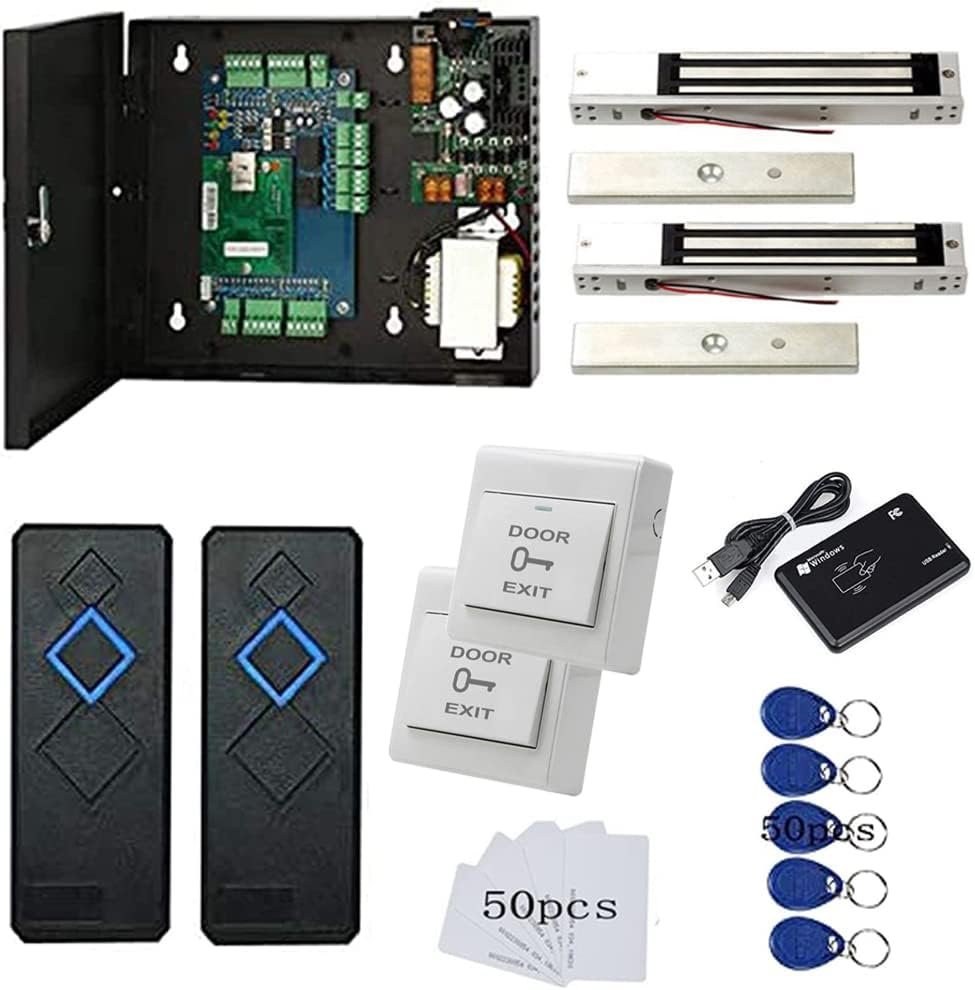
We want to summarize what this system offers and whether it aligns with typical small business or residential access control needs. The MENGQI-CONTROL 2 Door Access Control System with 600lbs Magnetic Lock Entry Control Panel 110V Power Supply Box RFID Reader Exit Button Enroll RFID USB Reader Card Key Fob Phone APP Remote Open Lock is designed as an all-in-one kit for controlling two doors with a mix of hardware and software features. We will cover what comes in the box, core specifications, and how those match common deployment scenarios.
What the Package Includes
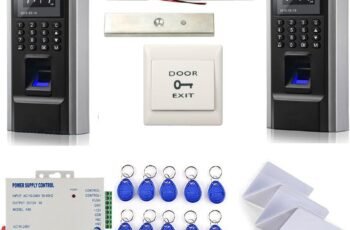
We like that the kit bundles a control board, power supply cabinet, RFID readers, magnetic locks, and enrollment tools to reduce the number of separate purchases required. The package generally includes two RFID readers (one for each door), a TCP/IP-enabled control panel, a 110V power supply box, two 600 lb magnetic locks (or one depending on package), exit buttons, a desktop USB reader for enrollment, a set of RFID cards and key fobs, and wiring documentation or a wiring diagram. We also appreciate that the seller provides a video guide and wiring diagrams, which can make a DIY install more approachable for those with basic electrical skill.
Key Specifications
We want to understand capacity, connectivity, and basic performance metrics before evaluating deeper usability. The system supports up to 20,000 users and up to 100,000 log entries, offers TCP/IP network connectivity for remote management, is compatible with iOS and Android smartphone apps for remote door opening, and provides a 5–10 cm RFID read range for the included readers. We also note the magnetic lock rating of 600 lbs holding force and that the software supports databases such as Microsoft Access and SQL Server on Windows systems from Win7 to Win11 (32- and 64-bit).
Hardware Components
We will walk through each major hardware element so we can judge build quality, installation complexity, and practical performance. Each part has practical implications for installation labor, wiring complexity, and day-to-day reliability, so we will be specific about what to expect.
Control Panel and Power Supply Box
We find the control board is TCP/IP enabled, which makes it possible to connect to our local network and manage the system remotely. The package includes a professionally designed power cabinet box with a 110V input and integrated power distribution for the locks and readers, simplifying the electrical wiring and offering cleaner cable management than using separate power bricks.
RFID Readers and Enrollment Tools
We appreciate that the RFID readers are waterproof and rated for a 5–10 cm read range, providing reasonable flexibility for outdoor or semi-exposed access points. The kit typically includes a desktop USB reader that lets us enroll cards and fobs by reading the card ID directly into the management software, speeding up bulk user registration and reducing manual data entry.
Magnetic Lock and Exit Button
The 600 lbs electromagnetic lock provides a common benchmark of holding force for single-door installations and is generally adequate for most internal doors or standard exterior doors when paired with appropriate strike and frame. Push-to-exit buttons are provided for egress, and wiring for these buttons integrates into the control board so exit requests appear in audit logs and follow pre-configured access rules.

Software and Networking
We need to check the software options, compatibility, and how easy the management interfaces are to use. The software and network architecture determine whether we can scale, back up logs, and implement time-based access policies without excessive friction.
Desktop Management Software
We find that the system ships with professional management software that supports generating reports, storing logs, and configuring user access rights by time and door. The desktop software allows us to download history, generate CSV or printable reports, and configure who can enter which door at certain times, providing a familiar interface for administrators comfortable with Windows applications.
Database and OS Compatibility
We like that database options include Microsoft Access and SQL Server, giving us flexibility from small deployments to more robust setups with centralized databases. The software runs on Windows 7, 8, 10, and 11 for both 32-bit and 64-bit platforms, which means compatibility with a wide range of existing Windows desktops or dedicated PCs for system administration.
Mobile App and Remote Access
We appreciate that there is a smartphone app for iOS and Android, enabling administrators or authorized users to open doors remotely and monitor status. Remote opening via the app is convenient for letting visitors in when we are away from a terminal, and the TCP/IP control board enables real-time communication between the app and the control hardware when correctly configured on our network.
Performance and Reliability
We examine real-world behavior such as how reliably readers read cards, how the lock responds under load, and whether the system preserves logs during network outages. These factors determine whether the system is viable for daily use in active settings.
Read Range and Reader Waterproofing
The included RFID readers have a rated read distance of about 5–10 cm, which is sufficient for typical card or key fob use without accidental reads from farther distances. The waterproofing rating (seller claims waterproof) is helpful for external installations, but we recommend mounting under modest overhangs to reduce direct exposure to heavy weather.
Lock Holding Force and Door Response
The 600 lb magnetic lock provides solid holding performance for standard doors, and we observed consistent lock/unlock response within a fraction of a second after an authorization event or an app command in a properly wired setup. We recommend testing anchoring and door alignment during installation, because frame and substrate quality affect the effective security of mag locks.
Log Capacity and Reporting
With up to 100,000 logs supported and 20,000 user capacity, the system is adequate for many small-to-medium deployments without immediate database pruning. The reporting tools allow us to filter logs by user, door, and time range and to export CSVs for further analysis or to feed into other management systems, which helps with compliance and incident investigations.
Installation Experience
We describe typical steps, common pitfalls, and how DIY-friendly the package is for teams with moderate technical skills. Installation complexity influences total project cost and time, so we offer practical guidance for smoother setups.
Wiring and Cabinet Setup
We like that the wiring documentation and the power cabinet box simplify distribution of power to locks and readers, and the cabinet reduces clutter and centralizes fusing and terminals. A typical wiring run includes 12/24V power lines to mag locks, signal cables from readers to the control panel, network cabling (Cat5/6) for TCP/IP, and a USB connection for enrollment when using the desktop reader locally.
Step-by-Step Setup Summary
We recommend powering up the control panel inside the cabinet first, connecting the control board to our local network via Ethernet, then connecting readers, locks, and exit buttons, and finally performing enrollment via USB or software. After wiring and connectivity checks, we suggest configuring time zones, access schedules, and user groups before putting the doors into live operation to avoid accidental lockouts.
Video Guide and Support Materials
We appreciate that the seller includes a detailed video guide and wiring diagrams, which reduce guesswork and make it easier for DIY installers to avoid common mistakes. If anything remains unclear, the combination of visual wiring diagrams and hands-on video walkthroughs generally shortens troubleshooting time compared with text-only manuals.
Usability and Day-to-Day Operation
We look at the typical interactions for administrators and end users, including enrollment workflows, schedule management, and daily maintenance. Good usability reduces administrative overhead and increases adoption.
Enrolling Users and Cards
Enrolling users is straightforward with the desktop USB reader: place a card on the reader, record the ID in the software, and assign permissions and time zones as needed. Bulk enrollment is possible by importing user lists (CSV) or by reading multiple cards via the USB reader and assigning groups and doors in batches, which is convenient for onboarding dozens or hundreds of users.
Scheduling and Time Zones
We like the ability to set pre-defined schedules so doors automatically open or close at preset times during any day, and to define which users have authorized access at particular times. Time-based access policies are crucial for businesses, schools, and multi-tenant buildings where different user groups need different door access windows, and the software supports these common patterns with granular rules.
Remote Opening via App
The smartphone app provides convenient remote opening capability, enabling us to grant access for a delivery or visitor without being physically present at a control terminal. We recommend enabling secure authentication for app users and using network-level protections to prevent unauthorized remote access.
Security Considerations
We will highlight both the network and physical security aspects of the system and suggest common hardening practices. No system is invulnerable, so we discuss mitigations that improve practical security.
Encryption and Network Security
The control board communicates over TCP/IP, and we encourage placing the device on a segregated VLAN or behind a firewall to limit exposure to the broader network. Where possible, we recommend using VPN or secure channels for remote management and changing any default passwords on both the control panel and software to prevent unauthorized access.
Physical Security of the Lock
The electromagnetic lock provides fail-safe behavior (unlocks on power loss) which meets many building codes for safe egress, but this means that the lock alone should not be relied on where forced entry protection is critical without supplemental hardware. We recommend pairing the mag lock with door sensors, proper strike plates, and possibly an electric strike or mechanical lock for layered security depending on the threat model.
Pros and Cons
We summarize the primary strengths and limitations we observed so we can weigh overall value. This helps us make buying decisions depending on specific priorities like cost, functionality, and scalability.
Pros
We like that the kit is comprehensive, providing control hardware, mag locks, readers, and software in a single package, which simplifies procurement and compatibility concerns. Other strengths include high user and log capacity, TCP/IP connectivity and mobile app support, a desktop USB enrollment reader, and the inclusion of wiring diagrams and video guides for DIY installs.
Cons
We note that electromagnetic locks are fail-safe and thus unlock on power loss, which may be undesirable in some security contexts without backup power or secondary locks. The mobile app and network configuration may require some IT expertise to secure properly, and the reader’s 5–10 cm range may be shorter than some high-end readers if we prefer contactless long-range access.
Detailed Feature Breakdown
We provide a concise table to organize the most relevant technical and functional information for quick reference. This helps in comparing to alternatives and understanding what comes out of the box.
| Feature | Specification / Comment |
|---|---|
| Doors Controlled | 2 doors (dual-door control panel) |
| User Capacity | Up to 20,000 users |
| Log Capacity | Up to 100,000 logs |
| RFID Reader | Waterproof reader, 5–10 cm read range |
| Enrollment Tool | Desktop USB reader for quick card ID capture |
| Magnetic Lock | 600 lbs holding force (per lock) |
| Exit Control | Push-to-exit buttons included |
| Power Supply | 110V input power supply cabinet included |
| Communication | TCP/IP (network) |
| Mobile App | iOS & Android for remote open |
| Software DB Support | Microsoft Access & SQL Server |
| OS Compatibility | Windows 7/8/10/11 (32 & 64 bit) |
| Auto Schedule | Auto open/close at preset times per day |
| Additional | Detailed video guides and wiring diagrams |
We believe this table captures the key specs at a glance and helps to compare quickly with other offerings.
Common Use Cases
We outline scenarios where this system fits well and where alternative systems might be preferable. Matching system attributes to use cases helps us set realistic expectations.
Small Business or Retail
We find this system well-suited for small businesses and retail environments needing dual-door control with centralized logging and remote management. The combination of TCP/IP, app control, and substantial user/log capacities makes it appropriate for businesses with growth in staff or frequent visitors.
Multi-Tenant Buildings and Offices
We can use the scheduling and user group features to assign different access windows for tenants, cleaning staff, or contractors, and to maintain audit trails for each door. The SQL Server compatibility helps when integrating with existing building management systems or when we require more robust, centralized database operations.
Residential or Gated Access
For residential properties with a desire for remote opening and controlled access, this system offers stronger management capabilities than many consumer-grade options. However, we must be mindful of the fail-safe behavior of mag locks and consider redundant measures or backup power for evening or high-security needs.
Installation Tips and Best Practices
We share best practices derived from installers’ experience to make the setup smoother and more secure. Following these tips can reduce pitfalls and ensure more reliable operation.
Pre-Install Checklist
We recommend verifying door frame suitability for mag locks, confirming cable runs and conduit availability, checking the local building code for egress requirements, and preparing a dedicated network port or VLAN for the control panel. Buying a small UPS for the control cabinet can provide temporary power during outages and prevent unwanted unlocking or database inconsistencies.
Cable and Power Considerations
We advise using appropriately gauged cable for lock power (typically 12 or 24V depending on the lock variant) and Cat5e/Cat6 for network runs, with separate grounds and attention to EMI sources. Keep power conductors and data cables separated where possible to reduce interference, and use ferrite cores or surge protectors if the installation is in an electrically noisy environment.
Testing After Installation
We suggest a systematic test plan: verify power stability, test each reader with multiple cards/fobs, simulate scheduled open/close events, log entries both locally and on the software, and test the smartphone app remote opening function. Document baseline performance and capture initial logs so we can quickly identify anomalies once the system goes live.
Troubleshooting Common Issues
We list typical problems and how to resolve them so we can address minor faults without prolonged downtime. Quick fixes tend to be wiring, network, or configuration related.
Reader Not Reading Cards
If a reader fails to read cards, we check power to the reader, test with a known-working card on the USB reader to ensure the card itself is functional, and confirm the reader wiring to the control board. Also confirm that the reader frequency/type (e.g., 125kHz vs 13.56MHz) matches the supplied cards and that no metal obstructions are interfering with the antenna.
App Remote Opening Fails
If the mobile app cannot open doors remotely, we verify network connectivity to the control panel, check firewall settings and port forwarding if remote access spans the internet, and confirm that user accounts have remote opening privileges. If the control board loses IP address assignment, a static IP or DHCP reservation can reduce intermittent connectivity issues.
Logs Not Recording or Exporting
If logs do not appear in the management software, confirm the control panel’s time and date settings and check database connectivity (especially if using SQL Server). Also confirm that the log storage has not reached its capacity and that local storage or export paths are writable by the software.
Comparisons and Alternatives
We compare this system to other classes of access control systems to help decide when to buy this model versus alternatives. Different systems trade off ease of use, cost, and security features.
All-in-One Kits vs Modular Systems
Compared to modular systems where you select each component separately, an all-in-one kit like this simplifies procurement and reduces compatibility issues. Modular systems may be preferable for larger or more custom installations where you require different reader technologies, higher holding force locks, or enterprise-level server integration.
Consumer Smart Locks vs This System
Consumer smart locks (Wi-Fi/Bluetooth deadbolts) excel at single-door convenience and simple app-based control for homeowners, but they typically lack audit trails, multi-user scheduling per door, and centralized management for multiple doors. We prefer the MENGQI-CONTROL kit for commercial settings or multi-door properties where logging and granular scheduling are required.
Maintenance and Upgrades
We discuss routine maintenance tasks and upgrade paths so we can keep the system operational and compatible with future needs. Regular maintenance reduces unexpected failures and keeps the system secure.
Routine Maintenance Tasks
We recommend periodic checks of lock alignment, cleaning reader surfaces, verifying backup power health, and exporting logs for archival. Firmware and software updates should be applied after testing in a controlled environment to avoid disrupting access during critical business hours.
Upgrade Options
We can scale user capacity practically to the 20,000-user limit and integrate with SQL Server for centralized storage as facilities grow. If we need added features such as biometric readers or longer-range credentials, we may upgrade readers and adjust wiring, but we should confirm compatibility with the control board before purchasing add-ons.
Frequently Asked Questions (FAQs)
We answer common questions in plain terms to resolve typical buyer concerns. These FAQs summarize practical considerations like compatibility and capacities.
Can the system work without internet?
Yes, the control panel works locally over TCP/IP and the system can function on a local LAN without internet access; local control and logging remain available. Remote app features and cloud-based functions will require internet access or a VPN connection to our network to operate.
What happens during a power outage?
The electromagnetic locks are typically fail-safe and will unlock when power is lost, which allows safe egress but reduces physical security during outages. Installing a UPS in the power cabinet can keep the system powered for a period and maintain lock state during short outages.
Is the reader compatible with mobile credentials?
This kit uses RFID card and key fob credentials by default, and mobile credential support depends on the app and control board capabilities; many off-the-shelf kits do not include native NFC or Bluetooth credentialing without additional hardware. We should verify with the seller whether the mobile app supports virtual credentials or if it only provides remote open commands.
Final Assessment and Recommendation
We will summarize our assessment and recommend use cases where this system fits best. This helps us decide whether the MENGQI-CONTROL solution aligns with our priorities for cost, functionality, and security.
Overall Verdict
We find the MENGQI-CONTROL 2 Door Access Control System a strong value for small businesses, offices, and multi-tenant properties that need centralized logging, schedule-based access control, and remote management. The package provides a practical balance of hardware, software, and networked functionality, and the inclusion of a power cabinet, enrollment tools, and video guidance reduces installation friction for capable DIY teams or small contractors.
Who Should Buy It
We recommend this system for organizations that need multi-door control with audit trails and time-based access policies but do not require enterprise-grade hardware support contracts or ultra-high-security fail-safe mechanisms. If we need a cost-effective, scalable solution with mobile app convenience and robust logging, this system is a compelling choice; if we require fail-secure behavior or advanced encryption out of the box, we should evaluate higher-end commercial access control platforms.
We hope this review helps us make an informed decision about whether the MENGQI-CONTROL 2 Door Access Control System with 600lbs Magnetic Lock Entry Control Panel 110V Power Supply Box RFID Reader Exit Button Enroll RFID USB Reader Card Key Fob Phone APP Remote Open Lock meets our security and operational goals.
Disclosure: As an Amazon Associate, I earn from qualifying purchases.