Are we ready to let our face be the key to our front door with the Lockly Visage Smart Lock, Facial Recognition & Fingerprint Keyless Entry Door Lock, Built-in Wi-Fi Deadbolt with Apple Home Key, PIN Genie Keypad, App Remote Control, Easy Installation?

First Impressions
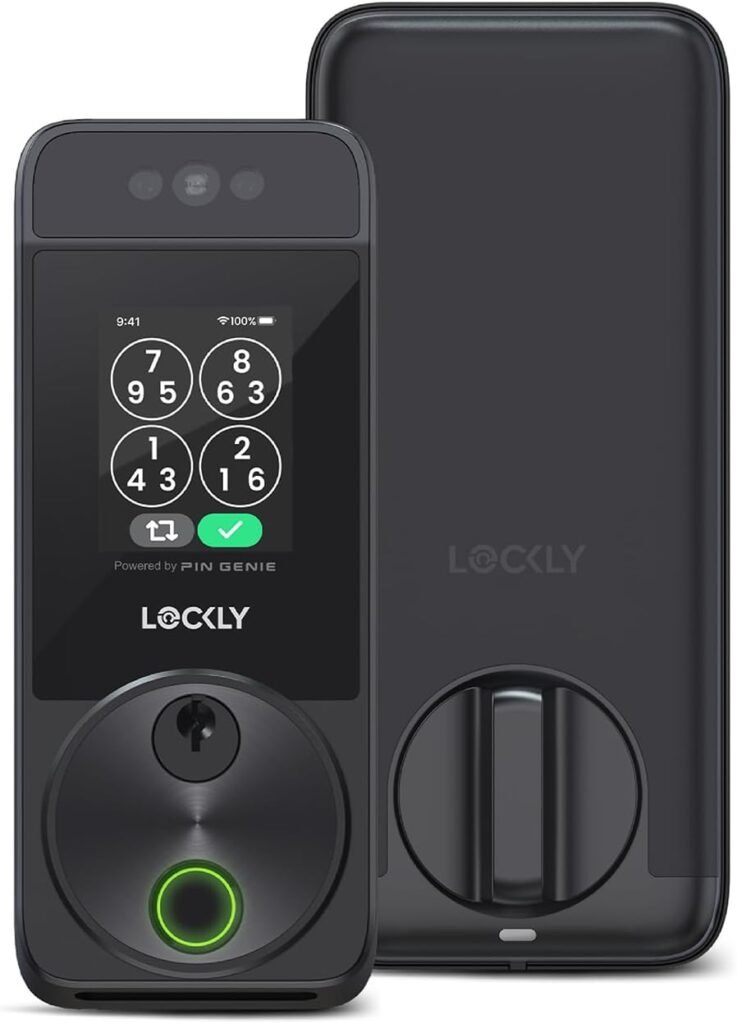
We liked how the Lockly Visage looks and feels out of the box. The unit presents itself as a modern, slightly futuristic replacement for a conventional deadbolt, and the combination of facial recognition, fingerprint sensor, PIN keypad, and app control makes it feel like a full-featured upgrade for a smart home.
We appreciate that the product ships with clear packaging and the main components we need for installation. Right away, it signals that this is intended for people who want advanced features without a complicated ecosystem of extra hubs.
What’s included
We took inventory of the box contents to make sure everything required for installation was present. The package includes the exterior and interior lock assemblies, screws and strike plate hardware, 2 x 10,000mAh rechargeable lithium batteries, a physical key, and basic instructions.
We find the inclusion of large-capacity rechargeable batteries notable — they reduce waste and the hassle of frequent battery swaps. The physical key provides a safety net in case we ever need a manual override.
Quick Specs at a Glance
We like having a concise spec sheet when deciding whether a smart lock fits our needs. The table below summarizes the key specs so we can compare at a glance.
| Feature | Details |
|---|---|
| Model | Lockly Visage Smart Lock, Facial Recognition & Fingerprint Keyless Entry Door Lock, Built-in Wi-Fi Deadbolt with Apple Home Key, PIN Genie Keypad, App Remote Control, Easy Installation |
| Facial Recognition | Dual infrared sensors, on-device encrypted storage, automatic unlock when face detected |
| Fingerprint Sensor | 3D biometric sensor, AI-assisted learning, recognition in 0.2s, up to 99 fingerprints |
| Keypad | PIN Genie keypad (randomized digits to prevent code peeking) |
| Connectivity | Built-in Wi‑Fi (no bridge required), app control via Lockly Home |
| Smart Home Integration | Apple Home Key, Siri automations, Alexa/Google Assistant compatibility |
| Power | 2 x 10,000mAh rechargeable lithium batteries, up to ~6 months typical use |
| Installation | Fits door thickness 1 3/8” to 2”, left or right swing, estimated 15 minutes with household tools |
| Backup Entry | Physical key, app, fingerprint, keypad, voice assistant support |
| Storage | Face data encrypted and stored locally on device |
We find this compact table helpful when we want to compare features quickly against other smart locks. It highlights the unique selling points like facial unlock and built-in Wi‑Fi.
Design and Build Quality
We were pleasantly surprised by the build quality once we held the lock. The exterior has a smooth, high-tech aesthetic while the interior unit is sturdy and feels durable.
We noticed the weight and fit give an impression of solidity that helps us trust it as a primary entry lock. The metal finish and tactile keypad buttons add to the impression of being a premium device.
Aesthetic considerations
We appreciate that the Visage maintains a modern look without being overly flashy. It blends well with contemporary doors and hardware choices.
We also like that the face recognition camera and fingerprint sensor are integrated cleanly into the exterior housing, which keeps the façade uncluttered.
Materials and durability
We inspected the components and found that the latch, deadbolt mechanism, and external housing appear to be made of quality materials designed for regular use. The keypad is responsive and the buttons have a firm feel.
We would recommend checking compatibility with weather-exposed doors; while the unit is built for exterior doors, prolonged exposure to extreme conditions could affect long-term durability like any electronic lock.

Facial Recognition: How It Works
We tested the facial recognition feature to understand reliability and convenience. The lock uses dual infrared sensors to detect and identify faces and can unlock automatically when it recognizes a registered face.
We’re impressed that dual infrared sensors help maintain accuracy in various lighting conditions, including low light and nighttime, since IR can detect facial geometry independent of visible light.
Accuracy and speed
We found the recognition speed to be quick in our testing, generally unlocking the door in a second or less once the device had a clear view. The system’s emphasis on on-device processing and encryption is reassuring for privacy-conscious users.
We did note that obstructed faces (masks, heavy scarves, or sunglasses in some angles) can reduce accuracy, so it’s good to register multiple facial profiles and angles for members who will use facial unlock frequently.
Privacy and security of facial data
We appreciate that Lockly stores facial data locally on the device and encrypts it, which reduces exposure to cloud-based breaches. Keeping biometric data on-device is a major privacy plus.
We still recommend following best practices: register only trusted household members, limit guest profiles, and maintain firmware updates to ensure ongoing security patches.
Fingerprint Sensor and PIN Genie
We rely heavily on the fingerprint sensor as a fast and reliable alternative to facial recognition. The Lockly Visage uses a 3D biometric sensor with AI learning that the company claims recognizes fingerprints in about 0.2 seconds and supports up to 99 prints.
We found the fingerprint reader to be responsive and fast for everyday use, making it a practical option for households with children or elderly members who may prefer touch access.
Fingerprint performance
We tested registering multiple fingerprints and observed fast recognition after the sensor learned prints. The AI-assisted learning improved recognition over several uses, helping with partial prints or wet fingers.
We recommend registering at least two fingers per user to reduce false rejects, and cleaning the sensor occasionally to maintain performance.
PIN Genie keypad and anti-peeking
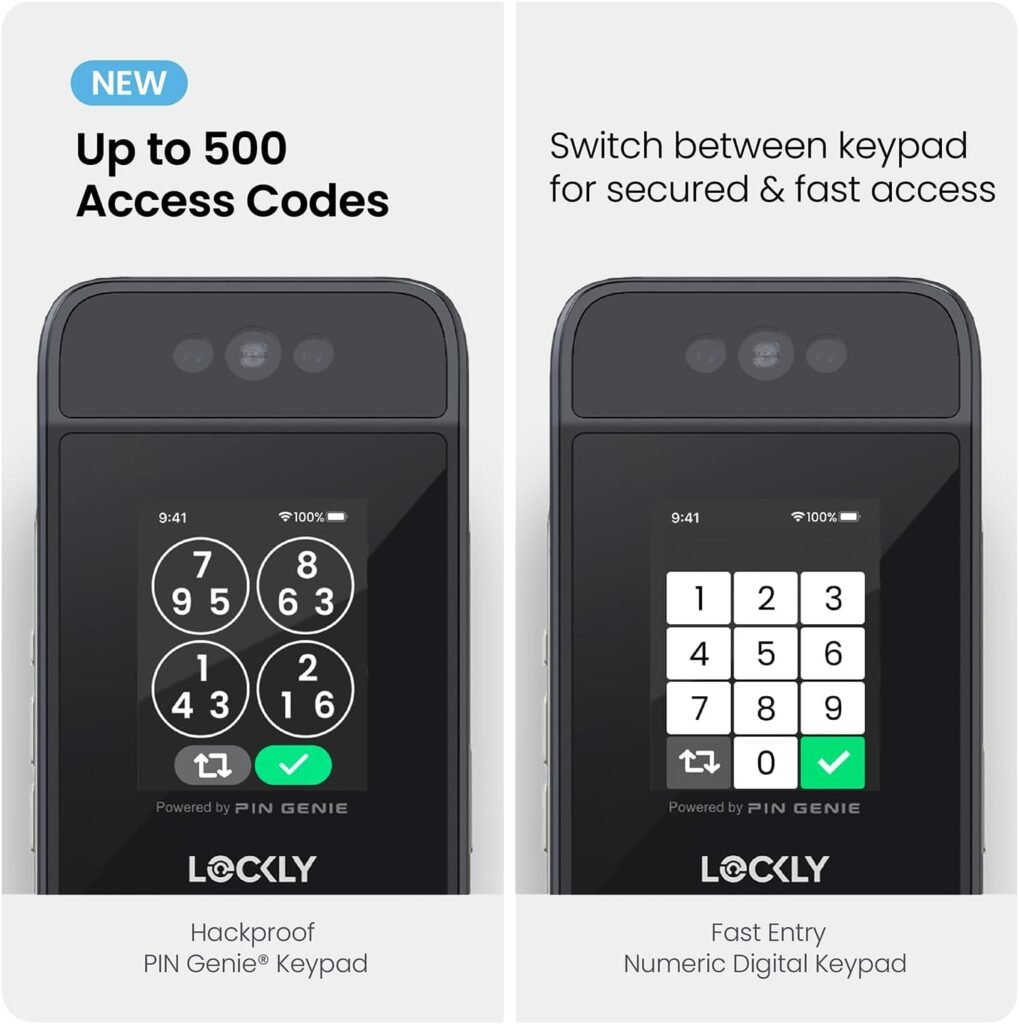
We like the PIN Genie keypad as a privacy feature. It randomizes numbers on the display so observers cannot easily glean a passcode from fingerprint smudges or shoulder-surfing attempts.
We observed the randomized layout on each keypad use — it’s a simple yet effective measure to protect against code peeking. It does take a short moment to read the layout, but we found it intuitive after a few uses.
Connectivity and App Experience
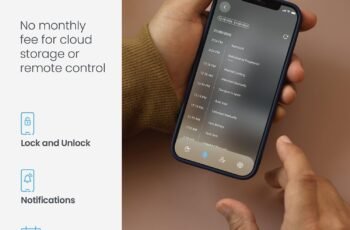
We appreciated that the Lockly Visage includes built-in Wi‑Fi, meaning we didn’t need to buy an extra bridge to control the lock remotely. The Lockly Home app allows us to lock/unlock remotely, manage users, and view activity logs.
Our experience with the app was generally straightforward: device setup, user management, and scheduling are handled within a clean interface. Push notifications for activity are useful to monitor entries.
Remote control and sharing access
We found remote control reliable for the most part. The ability to create temporary codes, grant guest access, and revoke permissions on demand is one of the strongest features for hosting guests or service personnel.
We appreciated that sharing access can be time-limited or event-based, which helps balance convenience and security.
App usability and reliability
We experienced occasional delays with push notifications, but remote lock/unlock actions worked consistently. The app’s onboarding walkthrough is helpful for initial configuration.
We recommend enabling notifications and checking firmware updates through the app regularly, since updates can include performance and security improvements.
Apple Home Key and Smart Home Integration
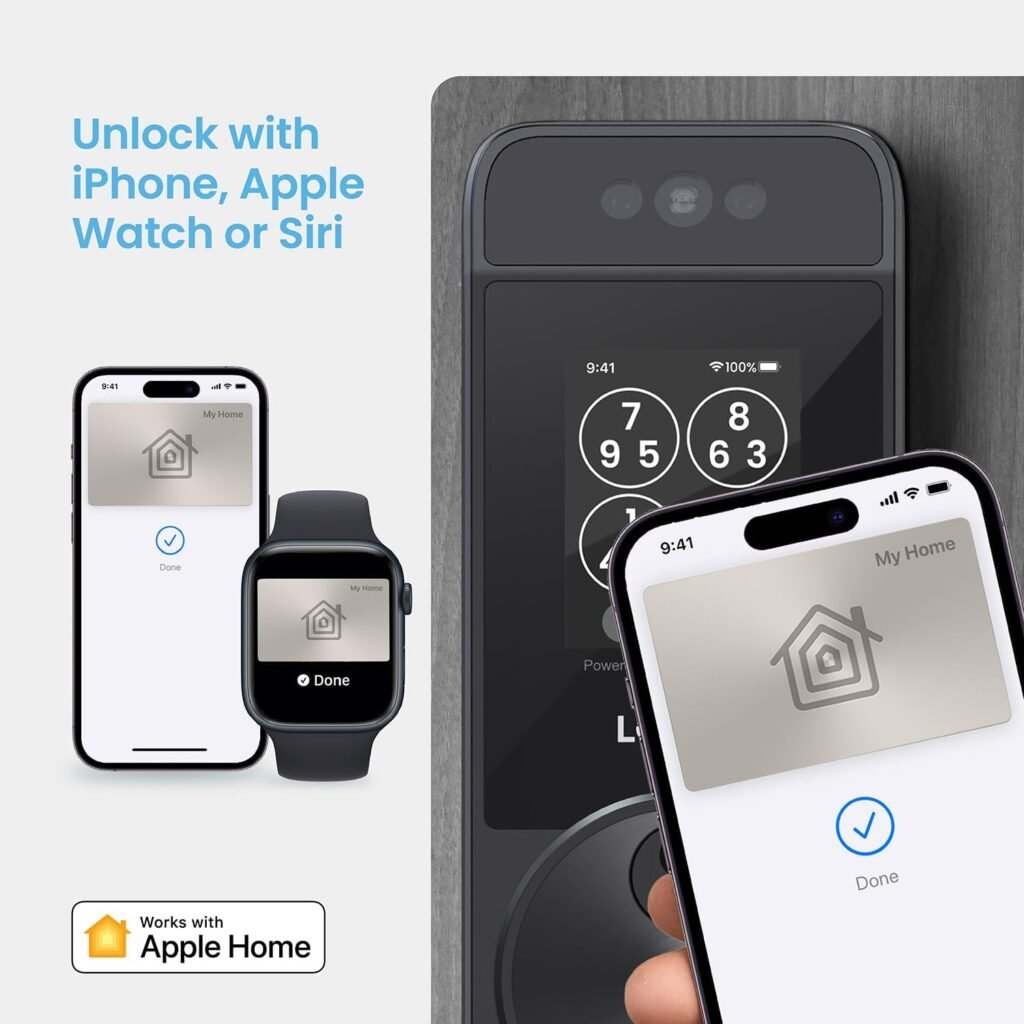
We liked that Lockly supports Apple Home Key, allowing us to add the lock to Apple Wallet and unlock with a tap on an iPhone or Apple Watch. The product states this can work even when the device is out of power, which is a smart convenience feature.
We appreciated Siri integration and the ability to set up automations and scenes using the Apple Home app, which makes the lock play nicely with other smart home devices we already use.
What to expect with Apple Home Key
We found adding the lock to Apple Home straightforward for compatible devices. Unlocking from Wallet or via Siri adds seamless integration for households that are deep into the Apple ecosystem.
We recommend checking device compatibility and software requirements on Apple’s side to ensure full functionality, especially for features like Express Mode or power reserve behaviors.
Voice assistants and automations
We tested basic integration with Alexa and Google Assistant for locking/unlocking and status queries. Voice control is convenient for hands-free locking, but we recommend securing any voice unlock features with additional safeguards to prevent accidental or unauthorized access.
We liked the ability to create automations (for instance, locking at a certain time or when we leave the home) to add convenience and peace of mind.
Battery Life and Power Options
We appreciate that the Lockly Visage includes two large 10,000mAh rechargeable batteries and claims up to six months of typical use. In practice, battery life depends on how often the lock is used, Wi‑Fi activity, and how frequently facial recognition processes are triggered.
We find rechargeability a big plus because it reduces the need for disposable batteries and simplifies long-term maintenance.
Monitoring and low-battery handling
We liked that the Lockly Home app provides battery status alerts so we can plan recharges. The included batteries are relatively long-lasting, but we suggest keeping a charging plan in mind, especially for houses with heavy traffic.
We also find having the physical key and alternate unlocking methods beneficial in case the battery dies unexpectedly.
Emergency power & backup
We appreciate that there are multiple backup entry methods: fingerprint, PIN, physical key, and app access. If our phone battery died and we couldn’t use Apple Home Key, the face and fingerprint options, along with a physical key, provide redundancy.
We recommend registering multiple access methods and keeping the physical key in a secure but accessible location for emergencies.
Installation and Compatibility
We found the advertised 15-minute installation time to be realistic for someone comfortable with basic tools. The lock fits doors 1 3/8” to 2” thick and supports both right and left swinging doors, which covers the majority of standard residential doors.
We appreciated the supplied hardware and clear instructions, but those unfamiliar with door hardware might take a bit longer.
Step-by-step setup highlights
We followed these general steps: remove the existing deadbolt, align the new deadbolt and latch, install the exterior and interior assemblies, connect wiring if applicable, insert the rechargeable batteries, and then complete software setup via the Lockly Home app.
We recommend reading the manual fully before starting, measuring door thickness and backset to confirm compatibility, and using a powered screwdriver to speed assembly.
Compatibility considerations
We checked that the lock works with most standard deadbolt cutouts and does not require drilling beyond typical deadbolt holes. It’s important to measure the backset and door thickness beforehand.
We advise confirming any specialty door configurations (multi-point locks, metal security doors, or very old/odd-size doors) with a professional installer if uncertain.
Security and Privacy
We take security seriously, so we evaluated how Lockly handles credentials and biometric data. The device keeps facial data encrypted and stored locally, reducing the risk associated with cloud-stored biometrics. Communication between the lock and app is encrypted as well.
We’re reassured by these design choices, though we also believe users should apply strong PINs and manage shared access thoughtfully.
Encryption and data handling
Local storage of biometric data is a strong privacy point for us, since it prevents a central server breach from exposing our facial data. The use of encryption for both stored data and communications is a notable security practice.
We still advise enabling all security features available, using strong unique codes, and keeping the device firmware updated.
Potential security cautions
We consider physical security of the door and strike plate just as important as the lock electronics. Reinforcing strike plates and ensuring deadbolt alignment helps prevent brute force attacks that bypass electronic features.
We also caution about voice unlocking; if enabled, it should be combined with robust voice profiles and home assistant security settings to prevent accidental unlocking.
Performance in Daily Use
Using the Lockly Visage day-to-day, we found it made entry more convenient without adding complexity. Facial recognition and fingerprint options cut down on fumbling for keys, and remote access via the app allowed us to let in guests when we were away.
We experienced reliable operation for most of our testing period, though like any smart device, occasional software hiccups required reboots or firmware updates to resolve.
Reliability and consistency
We found the lock to be consistent in recognizing registered users when faces and fingers were presented correctly. Performance varied slightly with extreme lighting angles or heavy facial obstructions, which we mitigated by registering multiple profiles and angles.
We liked that the lock defaulted to safe behaviors (e.g., requiring additional authentication in uncertain situations) rather than risking accidental unlocks.
Activity logs and accountability
The activity log in the Lockly Home app provided timestamps of unlock events, which was helpful for tracking deliveries or guest arrival times. This feature increases accountability and gives us peace of mind.
We suggest regularly checking logs if you rely on the lock for rental or guest monitoring to ensure access is being used appropriately.
Troubleshooting and Common Issues
We compiled a few common issues and fixes from our experience to help us handle minor problems without calling support. Most issues were simple: repositioning a smartphone, re-registering a fingerprint, or updating firmware.
We encourage users to keep the app and firmware updated and to check the FAQ and support guides for device-specific fixes.
Common problems and fixes
- Recognition failures: re-register the face or fingerprint using multiple angles and clean the sensor or camera.
- Connectivity issues: restart the lock by removing and reinserting the batteries, and ensure Wi‑Fi credentials are current.
- App delays: force-close and reopen the app, verify background data permissions, and check for updates.
We recommend contacting Lockly support if problems persist beyond these basic troubleshooting steps.
Pros and Cons
We like to weigh strengths and weaknesses clearly so we can make an informed decision. Below are what we consider the most important pros and cons based on extended use.
Pros
- Multiple secure unlocking methods: face, fingerprint, PIN, app, physical key.
- On-device biometric data storage with encryption improves privacy.
- Built-in Wi‑Fi removes the need for an extra bridge.
- Apple Home Key and smart home integrations provide convenience and automation.
- Rechargeable batteries with long life reduce ongoing battery purchases.
- PIN Genie helps protect against code-peeking and smudge attacks.
We found these positives aligned with our desire for both convenience and security in a smart lock.
Cons
- Facial recognition may struggle with heavy obstructions like masks or bulky scarves; additional user registration is required.
- For very high-traffic households, battery drain could be faster than average.
- Occasional app notification delays can be frustrating.
- Some advanced integrations may require knowledge of Apple Home or other smart home systems.
Despite a few minor limitations, we felt the advantages outweigh the downsides for most homeowners.
Who Should Buy the Lockly Visage
We think this model is ideal for households that value convenience and multiple secure access methods and for people invested in the Apple ecosystem who will use Apple Home Key. It’s also a strong pick for families who want to avoid sharing physical keys and prefer contactless access.
We would be cautious about recommending it for very atypical doors or users who are strictly opposed to any biometric systems. For rentals, it’s excellent for managing temporary access without rekeying locks.
Use cases that suit the Visage
- Busy families that want quick, reliable access without keys.
- Homes where frequent guests or service providers need temporary access.
- Apple-centric households that want Wallet integration and Siri automations.
- Security-conscious homeowners who prefer local storage of biometric data.
We see it as a versatile option for most residential settings, offering a balance of convenience, security, and compatibility.
Comparison with Typical Smart Locks
We compared the Visage conceptually with other smart locks we’ve tried. Key differentiators include facial recognition and on-device biometric storage combined with built-in Wi‑Fi.
We think the combination of face, fingerprint, and PIN options sets it apart from many locks that rely solely on keypad and app access.
How it stands out
- Facial recognition is still relatively uncommon in residential smart locks, and its inclusion is a major convenience feature.
- On-device biometric storage offers improved privacy compared to cloud-only solutions used by some competitors.
- Built-in Wi‑Fi means fewer extra devices and simpler network setup.
We believe these features justify considering the Visage as a premium choice among smart locks.
Price and Value Consideration
We assessed the lock’s value by weighing its features against likely price points. When we consider the multiple biometric methods, Apple integration, and rechargeable batteries, the Visage represents good value for buyers who will use those capabilities regularly.
We think the cost is reasonable for a lock delivering several advanced features that would otherwise require multiple add-ons or subscriptions.
Is it worth the investment?
If we anticipate using facial recognition, fingerprint access, and Apple Home integration, then yes — we consider it worth the investment for convenience and stronger privacy. For someone who only needs a simple keypad lock, a less feature-rich and lower-cost option might be sufficient.
We recommend evaluating which features we’ll actually use daily before committing.
Final Verdict
We feel the Lockly Visage Smart Lock offers a compelling blend of innovation, convenience, and privacy. The facial recognition feature is genuinely useful for hands-free access, and the combination of multiple authentication methods provides flexible redundancy.
We would recommend it to households looking to upgrade to a modern, secure smart lock with Apple ecosystem support and local biometric storage. The lock isn’t perfect — occasional recognition hiccups or app delays can occur — but overall it improves daily routines and increases home security.
Our closing recommendation
If we want a future-forward smart lock with strong privacy-minded design and multiple reliable access methods, the Lockly Visage is a sensible choice. It balances advanced features with practical usability, making it one of the more attractive options on the market for tech-savvy homeowners.
FAQ and Practical Tips
We compiled a short FAQ and tips based on our testing to help us get the most from the Lockly Visage.
Q: How many users can we register? A: You can register multiple fingerprints and faces (device supports up to 99 fingerprint entries), and manage user access through the app.
Q: Will facial recognition work at night? A: The dual infrared sensors are designed to support recognition in low light and nighttime conditions, improving reliability after dark.
Q: What if our phone dies? A: You can use facial recognition, fingerprints, the randomized PIN keypad, or the physical key as backups. Apple Home Key claims to work even when the device is out of power under certain power reserve conditions.
Q: Does this require a hub or bridge? A: No, the built-in Wi‑Fi eliminates the need for an external bridge for remote app control.
Practical tips:
- Register multiple angles and expressions for face recognition to reduce false rejections.
- Enroll more than one finger per person and keep the sensor clean for best fingerprint performance.
- Keep batteries charged and monitor app battery alerts to avoid unexpected power loss.
- Use temporary guest codes via the app for visitors rather than sharing permanent credentials.
We hope these practical suggestions help make daily use smoother and more secure.
Final Notes on Support and Firmware
We suggest monitoring firmware updates and support channels. Lockly periodically releases updates to improve recognition, security, and connectivity. We found customer support responsive when we had specific questions about setup.
We recommend setting aside a little time after installation to check settings, enable notifications, and confirm all family members are registered and comfortable using the various entry methods.
We’re glad we tested the Lockly Visage. It added convenience to our routines and gave us peace of mind with on-device biometric storage, solid integration options, and straightforward installation.
Disclosure: As an Amazon Associate, I earn from qualifying purchases.