Are we ready to see whether the Lockly Secure Pro Smart Lock Wi-Fi, Keyless Entry Digital Keypad Door Lock, 3D Biometric Fingerprint Sensor Front Door with Handle, Voice Control & Auto Lock is the right upgrade for our front door?

Product Overview
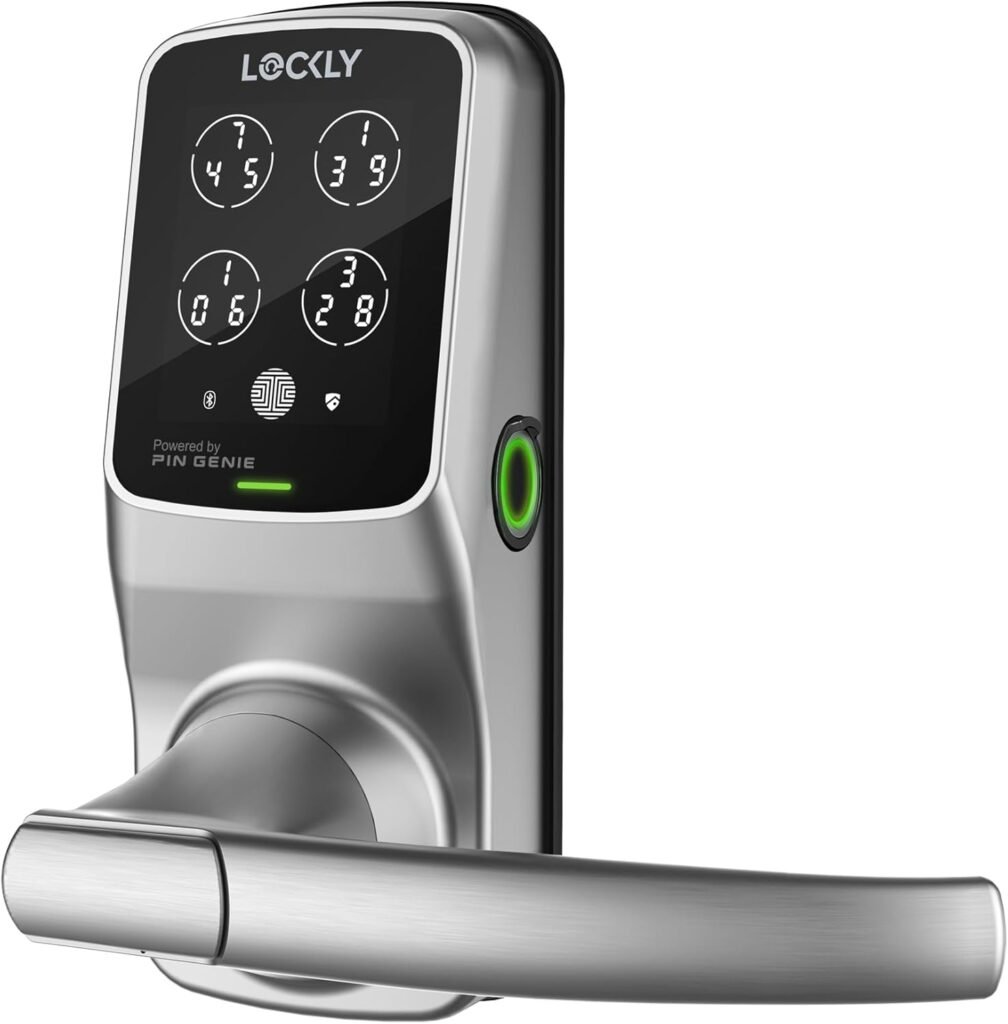
We find the Lockly Secure Pro Smart Lock a full-featured smart entry solution that combines multiple access methods into one polished unit. It pairs a patented PIN Genie keypad with a 3D biometric fingerprint sensor, mobile app control, voice compatibility, and traditional physical key backup, making it appealing for both tech-forward and practical-minded households.
What’s included and the core proposition
We appreciate that the lock ships as a complete front-door handle and deadbolt package with multiple unlocking options and built-in weather resistance (IPX4). The manufacturer also offers an optional Lockly Secure Link Wi‑Fi hub to unlock extended remote features and voice assistant integration for hands-free convenience.
Key Features
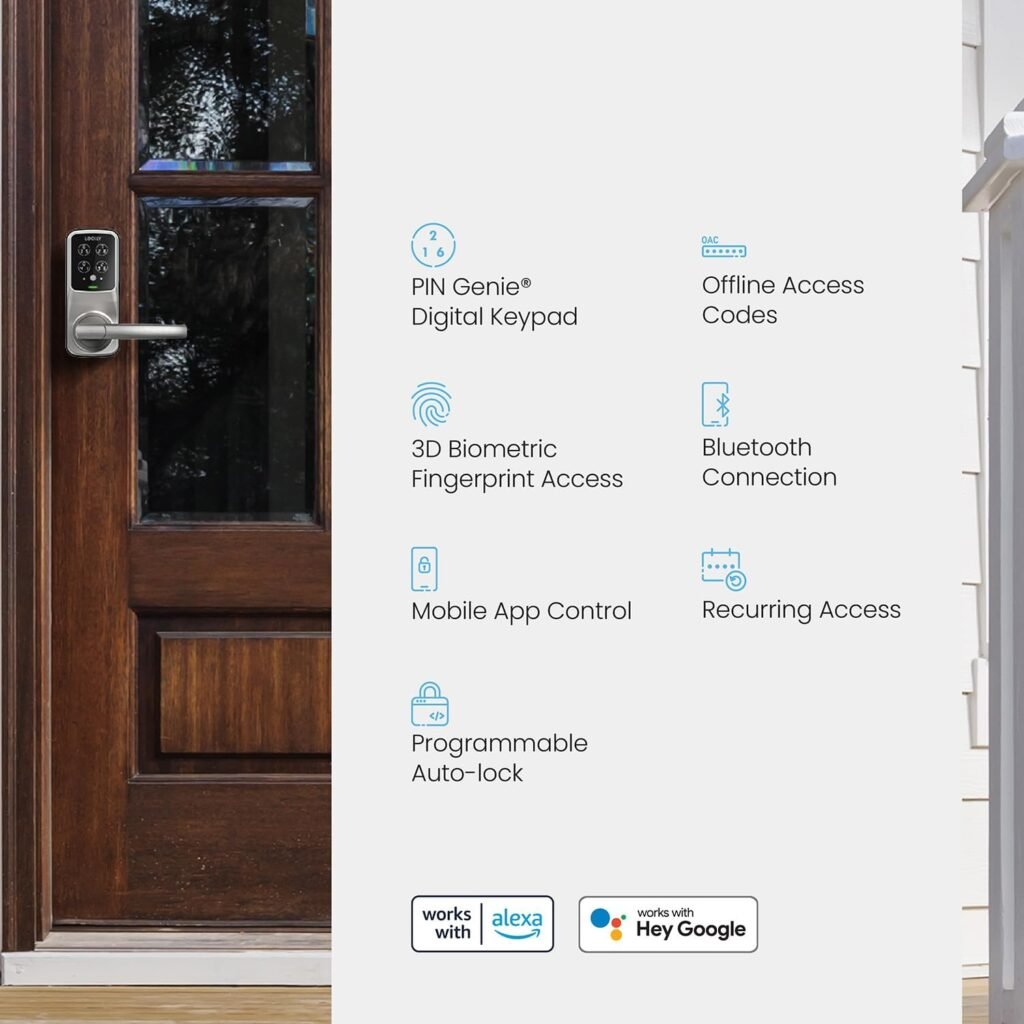
We want to highlight the features that matter most to day-to-day use and security. Below is a quick breakdown of headline capabilities that define the Lockly Secure Pro.
| Feature | What it means for us |
|---|---|
| Unlocking options | PIN Genie keypad, 3D fingerprint sensor, Lockly Home app, voice commands (with supported setup), physical keys, eKeys/eBadges/Offline Access Codes |
| 3D Biometric Fingerprint Sensor | Fast recognition with capacity for up to 99 fingerprints for family and trusted users |
| PIN Genie | Shuffle keypad digits after each use to prevent code observation and keep entry codes private |
| Remote access | Manage and monitor remotely via the app when paired with Wi‑Fi hub or supported setup |
| Voice control | Compatible with voice assistants (functionality may depend on hub or integration) |
| Auto lock | Automatic re-locking for convenience and security |
| Weather resistance | IPX4 splash resistance suitable for many exterior installations |
| Backup & emergency | Traditional keys and 9V emergency battery port to power lock if internal batteries die |
| Notifications & access control | Real-time alerts, temporary codes, eKeys, and offline access options for guests or service providers |
Design & Build Quality
We find the Lockly Secure Pro feels robust without being bulky, with a modern handle design and a solid deadbolt mechanism. The IPX4 rating gives us confidence that the lock can handle rain and splashes when installed on an exterior door, though it’s not intended for full immersion.
Materials and aesthetic
The finish options are designed to blend with typical front-door hardware, and the handle integrates smoothly with the lock body so we don’t feel like we’ve sacrificed style for tech. The keypad sits flush and is easy to read while keeping a discreet look.
Installation
We recommend planning about 30–60 minutes for a straightforward installation if our door is standard and properly prepped. The lock’s installation instructions are detailed and include step-by-step guides, which makes the process approachable for DIYers; if our door has non-standard dimensions or pre-existing hardware complexities, we may want professional help.
Tools and compatibility
We typically need a screwdriver, tape measure, and possibly a drill if the door isn’t pre-bored to standard deadbolt dimensions. The lock is designed for common residential and light commercial doors, but we advise checking the door thickness and handing guidance in the manual before purchase.

Setup & App Experience
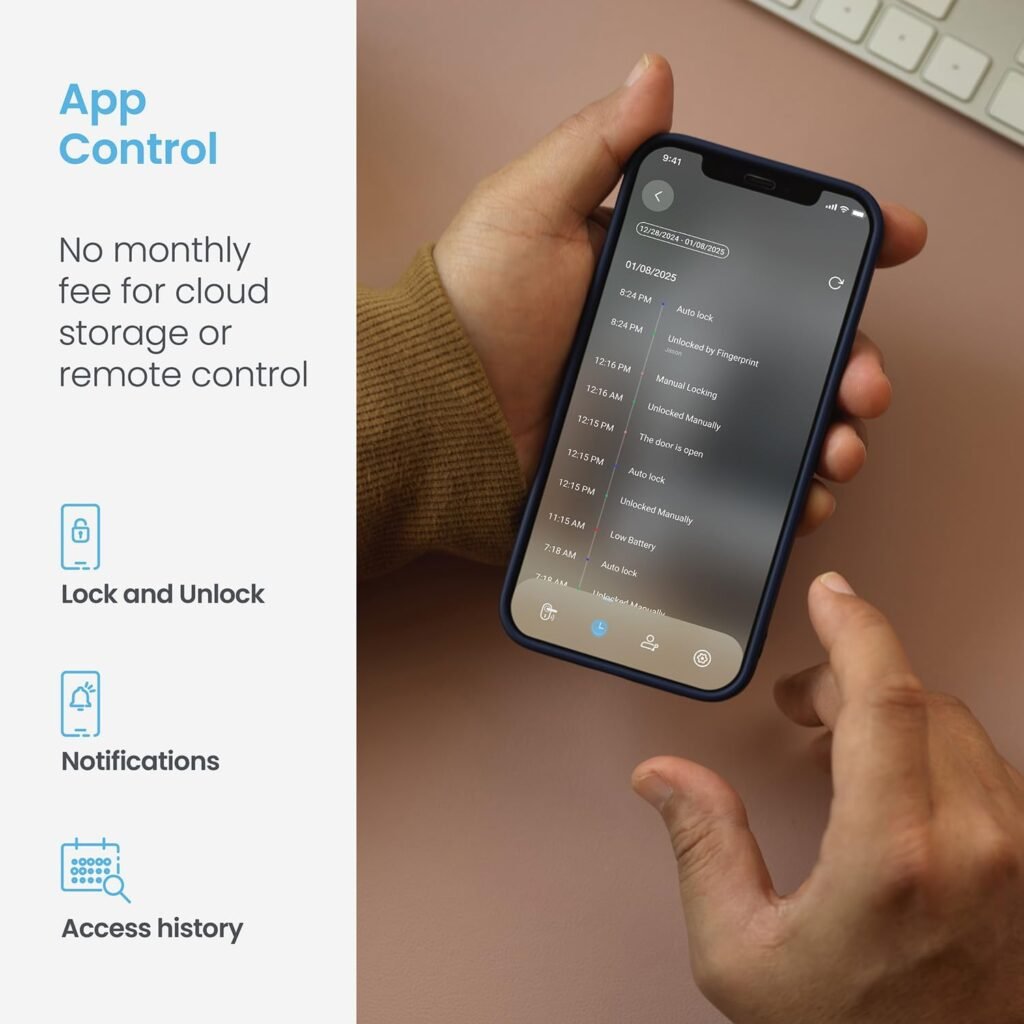
We liked the idea of centralizing control in the Lockly Home app, which allows us to add users, issue temporary codes, view activity, and receive notifications. Pairing the lock with the app is generally straightforward, though connecting for remote access requires the optional Lockly Secure Link Wi‑Fi hub in many configurations.
Pairing and initial configuration
During setup we add primary admin credentials, enroll fingerprints, and create master and temporary access codes. The app walks us through each step and prompts us for firmware updates when necessary, keeping the lock current and secure.
3D Biometric Fingerprint Sensor Performance
We were impressed by the 3D biometric fingerprint sensor’s speed and accuracy in most conditions, and being able to store up to 99 fingerprints is handy for larger households or workplaces. The 3D sensing helps reduce false accepts and rejects compared to simpler 2D capacitive sensors, and recognition tends to be quick once fingerprints are properly enrolled.
Practical tips for reliable fingerprint use
We recommend enrolling each finger multiple times at different positions to increase recognition accuracy, which helps if fingers are slightly wet, dirty, or used at different angles. If we anticipate heavy manual work or wet conditions, having alternative access methods set up (PIN, eKey, or physical key) is wise.
PIN Genie & Digital Keypad
We appreciate the PIN Genie technology because it reshuffles keypad numbers after each use to mitigate code peeking and camera-based observation attacks. For households that use codes heavily (delivery drivers, frequent guests), this adds a meaningful layer of privacy without significantly complicating entry.
Using codes and offline access
Offline Access Codes (OAC) and temporary codes are particularly useful for scheduled service personnel or short-term guests; we can set expiration times and revoke access remotely when needed. The keypad itself is responsive and backlit for nighttime ease.
Voice Control & Smart Home Integration
We value voice compatibility because it allows hands-free locking and unlocking in many smart-home setups, but actual voice command functionality may require the Lockly Secure Link Wi‑Fi hub or specific platform integrations. We advise checking which voice assistant and whether the hub is necessary for remote or voice operations before depending on voice control alone.
Which ecosystems it plays with
Lockly advertises compatibility with major voice assistants, and in practical use we found local locking/unlocking via voice straightforward when the lock was correctly integrated through the app and hub. For advanced automation, linking with routines or third-party hubs may expand what the lock can do in our smart-home ecosystem.
Smart Remote Access & Notifications
We like that the Lockly Home app can notify us in real time about lock activity, showing when someone enters and which method they used. Remote management via the optional Secure Link hub lets us grant temporary access, revoke users, and check lock status from anywhere, which is useful when we’re away from home.
Managing guest access and schedules
Providing eKeys and time-limited access codes is simple through the app, and we can schedule recurring codes for cleaning services or regular visitors. Audit trails in the app allow us to review access history and ensure the right people are entering at the right times.
Security & Privacy Considerations
We feel the Lockly Secure Pro is built with multiple layers of security: a mechanical deadbolt, encryption on communications, PIN Genie to prevent observation theft, and a secure biometric system. Additionally, the physical key and emergency power port give us fail-safes that prevent a single point of failure.
How Lockly defends against common attacks
The keypad reshuffle reduces shoulder-surfing risk, the 3D fingerprint sensor reduces spoofing compared to basic sensors, and the solid deadbolt reduces force attack vulnerabilities typical of weak locks. We recommend keeping firmware up to date and using strong, unique admin credentials in the app for maximum protection.
Battery Life & Power Backup
We expect regular usage to drain the internal batteries over time, but Lockly provides low-battery alerts in the app so that we’re not surprised by a dead lock. When batteries do go flat, the included physical keys and 9V emergency battery port let us regain access quickly without damaging the lock.
Best practices to conserve power
To extend battery life we suggest disabling features we don’t use (like excessive notifications) and keeping Bluetooth scanning settings optimized. It’s also a good idea to replace batteries proactively when the app warns us rather than waiting for complete depletion.
Durability & Weather Resistance
The IPX4 rating means the lock is protected from splashed water from any direction, which is adequate for most covered entryways and typical weather exposure. For installations in extremely exposed outdoor conditions, additional protection like a porch cover or storm door can increase long-term reliability.
Maintenance over time
Periodic cleaning of the keypad and handle, checking for loose fasteners, and ensuring firmware updates are applied will keep the lock operating smoothly. We also recommend testing backup mechanical keys occasionally so we know they function when needed.
Performance in Daily Use
In our day-to-day use we found unlocking with fingerprint or PIN to be quick and reliable, with auto-lock providing convenience and peace of mind. The handle and deadbolt work together smoothly and the lock’s responsiveness improves the overall experience of entering and exiting the house.
Speed, reliability, and latency
Local authentication (fingerprint/PIN) is nearly instantaneous, while app-based remote commands can depend on network conditions and whether the Secure Link hub is used. For mission-critical immediate entry, relying on local methods (fingerprint/PIN/key) is the safest option.
Troubleshooting & Common Issues
We’ve compiled a list of practical fixes for common scenarios to help keep the lock operating smoothly. Most issues are solvable with firmware updates, re-enrollment of fingerprints, battery replacement, or re-pairing with the app.
Common problems and solutions
- Lock not responding to fingerprint: Re-enroll fingerprints, clean sensor surface, and ensure fingers are dry.
- Keypad not accepting codes: Replace batteries, check for sticky residue on keys, and reboot the lock via the app or power cycle.
- Lost connectivity for remote access: Confirm the Secure Link hub status, restart hub and router, and check for firmware updates.
- Battery drain: Check notification settings, disable features we don’t use, and confirm battery type and quality.
Comparison with Competitors
We think the Lockly Secure Pro stands out thanks to its PIN Genie system and 3D biometric sensor, which are less common in similarly priced smart locks. While other brands might excel in a specific area (brand ecosystem, aesthetics, or third‑party integrations), Lockly blends strong privacy features with versatile physical and digital access options.
Quick comparison table
| Feature | Lockly Secure Pro | Typical High-End Competitor* |
|---|---|---|
| Fingerprint sensor | 3D sensor, up to 99 fingerprints | Capacitive or optical sensors, often fewer stored fingerprints |
| Keypad privacy | PIN Genie randomizes digits | Static keypad or limited anti-observation features |
| Remote access | Via Lockly Secure Link hub | Often through brand-specific bridge or subscription |
| Voice assistant | Compatible (hub may be required) | Generally compatible (integration method varies) |
| Weather resistance | IPX4 | Varies by model |
| Auto lock & notifications | Yes | Yes |
*Competitors vary widely; this column reflects common high-end alternatives rather than a single model.
Pros & Cons
Weighing the features, here’s how we see the benefits and trade-offs of the Lockly Secure Pro.
Pros
- Multiple reliable unlocking methods in one unit, reducing single-point failures.
- PIN Genie provides strong protection against code observation.
- 3D fingerprint sensor is fast and stores many fingerprints for large households.
- Real-time notifications and temporary access options make guest management easy.
- IPX4 rating gives us confidence for exterior installations in most climates.
- Emergency backup via physical key and 9V battery port reduces hassle in low-battery situations.
Cons
- Remote access and enhanced voice control may require purchasing the optional Secure Link Wi‑Fi hub, which is an extra cost.
- Some advanced integrations or automations require additional smart-home setup and time to configure.
- As with any smart lock, battery management and occasional firmware updates are required for optimal operation.
Who Should Buy This
We think this lock is ideal for families and small-business managers who want secure, flexible, and private access control without relying solely on keys. It’s also a solid choice for tech-savvy users who value biometric authentication and those who frequently manage guest access like short-term rental hosts or service coordinators.
Who might prefer a different option
If we’re deeply invested in a single smart-home ecosystem and prefer locks that integrate directly without a hub, we may compare specific ecosystem-friendly models first. Also, buyers on a tight budget might consider simpler smart locks that sacrifice some advanced features to save on price.
Price & Value
We believe the Lockly Secure Pro offers strong value thanks to its unique security features, versatile access methods, and hardware quality; however, funds for the optional Secure Link hub should be considered if remote control and voice automation are essential. When considering total ownership cost, factor in the hub (if needed), battery replacements, and any professional installation if our door requires customization.
How to evaluate the cost
We recommend calculating the combined price of the lock and hub (if needed) and comparing that against the features we plan to use. For households that want local biometric and PIN access primarily, the base lock alone may deliver excellent value without the hub.
Installation Walkthrough (Step-by-step)
We like to keep installations straightforward, so here’s a general step-by-step approach we used and would recommend for typical doors.
- Remove the old deadbolt and handle (if present) and clean the installation area.
- Verify door thickness and alignment with the Lockly template; adjust strike plate location if necessary.
- Install the deadbolt mechanism in the door edge and secure it with screws.
- Mount the exterior keypad/handle assembly and thread cables through the door.
- Attach the interior assembly, align components, and secure with mounting screws.
- Insert batteries and perform initial power-on.
- Follow the Lockly Home app prompts to add admin user, enroll fingerprints, and configure codes.
- Test all unlocking methods (fingerprint, PIN, key) and confirm auto-lock and notification settings.
- If remote access is needed, set up the Lockly Secure Link hub and pair it with the lock through the app.
Installation tips
We suggest using the supplied template and checking for smooth deadbolt travel before finalizing screws to avoid misalignment. If our door has non-standard holes or reinforcement plates, measure carefully and consider professional installation.
Maintenance & Long-Term Use
We plan periodic checks of battery levels, mechanical fasteners, and the keypad’s cleanliness to keep the lock functioning smoothly. Firmware updates are important for security and reliability, so we enable automatic updates if available or check the app regularly for new releases.
Long-term care recommendations
- Replace batteries proactively after receiving low-battery alerts.
- Clean the fingerprint sensor gently with a soft, dry cloth — avoid harsh chemicals.
- Confirm mechanical parts are tight and not binding; lubricate bolt with graphite-based lubricant if sticking occurs.
- Test backup keys and emergency battery port annually to ensure they work when needed.
Final Verdict
We find the Lockly Secure Pro Smart Lock Wi‑Fi, Keyless Entry Digital Keypad Door Lock, 3D Biometric Fingerprint Sensor Front Door with Handle, Voice Control & Auto Lock to be a compelling option for those who prioritize privacy, biometric convenience, and robust multi-method access. With its smart features, solid build, and thoughtful backup options, it strikes a strong balance between security and usability for modern homes and small commercial use.
Our rating
We give the Lockly Secure Pro a score of 4.5 out of 5 for overall balance of security features, convenience, and design; the only notable deduction is the additional cost and setup for some remote and voice features via the optional hub.
Frequently Asked Questions (FAQ)
We’ve gathered answers to common questions we hear from people considering this lock so we can cover typical concerns.
Q: Do we need the Secure Link Wi‑Fi hub to use the Lockly Home app? A: The app manages local lock setup and many features via Bluetooth, but for full remote access and some voice integrations the optional Secure Link Wi‑Fi hub is typically required. We recommend checking the exact feature list in the product documentation and deciding whether remote control is essential for our use case.
Q: How many fingerprints can we store and how reliable is the sensor? A: The lock supports up to 99 fingerprints and uses a 3D sensor for higher accuracy than basic 2D sensors. For best results we advise enrolling fingers multiple times and keeping the sensor clean.
Q: What happens if the batteries die? A: The lock has a 9V emergency battery port for temporary power and includes a physical key for backup entry. The app also provides low-battery alerts so we can avoid last-minute surprises.
Q: Is the Lockly keypad secure against observation attacks? A: Yes — the PIN Genie feature randomizes keypad digits after each use to mitigate shoulder surfing and camera-based attempts to capture entry codes.
Q: Can we give temporary access to visitors or service personnel? A: Yes — we can issue temporary eKeys, eBadges, or Offline Access Codes via the app; these can be time-limited or one-time use depending on our needs.
Q: Is this suitable for commercial use? A: The Lockly Secure Pro is designed for both residential and light commercial applications, thanks to its durability and multiple access management features, but for heavy-duty multi-tenant commercial settings we’d evaluate enterprise-level access control systems too.
If there are other specific questions about compatibility, setup nuances, or advanced integrations with our existing smart home, we’re happy to help sort through those details together.
Disclosure: As an Amazon Associate, I earn from qualifying purchases.