Could this single smart lock really replace our traditional keys and still give us the reliability and features we expect for everyday use?

Product Overview
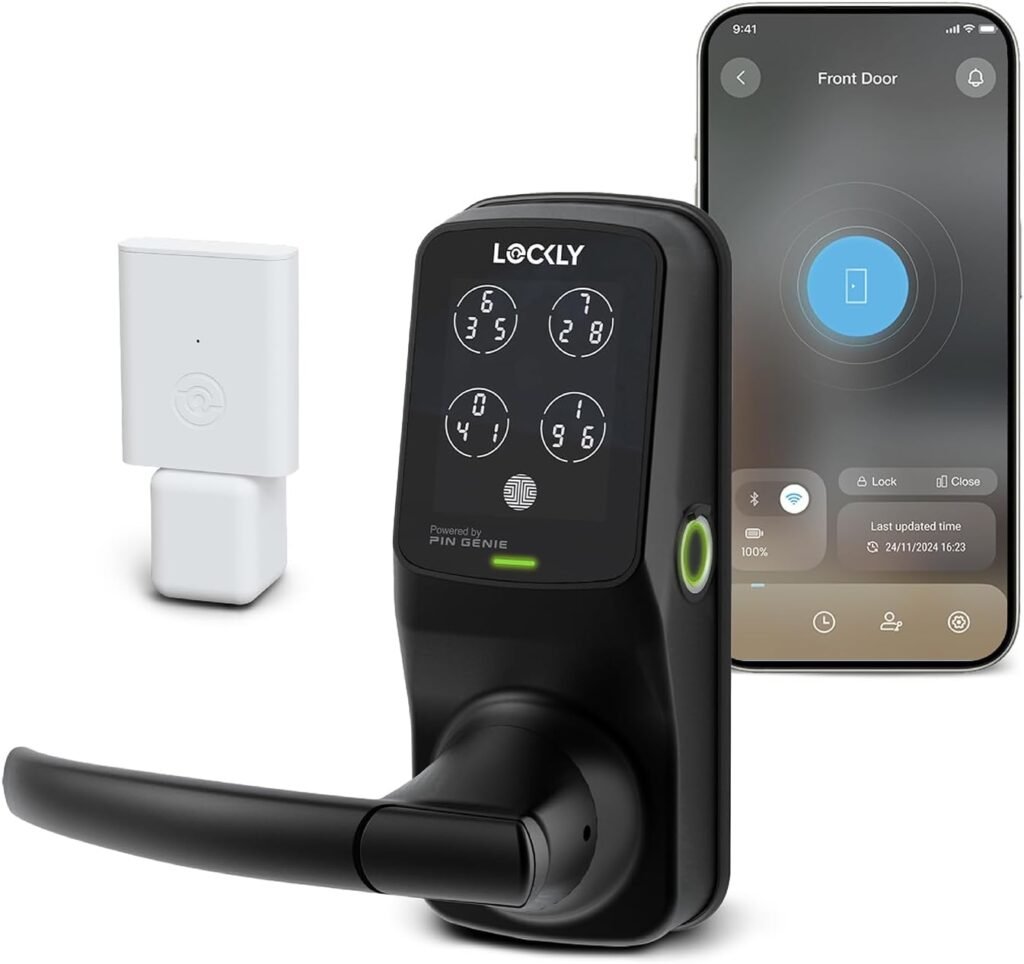
We’ll summarize what the Lockly Secure Pro Smart Lock offers and why it might be worth considering. The Lockly Secure Pro Smart Lock Wi-Fi, Keyless Entry Digital Keypad Door Lock, 3D Biometric Fingerprint Sensor Front Door Lock with Handle, Voice Control & Auto Lock – Latch Edition brings multiple modern access methods together in a single unit designed for both residential and light commercial use.
What the product includes
We want to make sure we understand the core components before getting into performance. The product centers on a digital keypad with patented PIN Genie technology, a 3D biometric fingerprint sensor, mobile app control, voice assistant compatibility, physical key backup, and support for an optional Lockly Secure Link Wi‑Fi hub to extend functionality.
Who this is for
We see this appealing to households that want keyless convenience without sacrificing security, landlords and property managers who need flexible access options, and tech-savvy users who like remote control and real-time alerts. Organizations that need reliable front-door access with a weather-resistant rating (IPX4) will also appreciate the design.
Key Features
We’ll list and describe the major features so we can assess how they fit our needs. Each feature combines convenience and security in its own way, and we’ll address practical implications below.
Versatile unlocking options
We believe having multiple ways to enter is essential for daily life. The Lockly Secure Pro supports the patented PIN Genie keypad, up to 99 stored fingerprints with its 3D biometric sensor, mobile app management, voice commands, and traditional physical keys for backup.
PIN Genie technology
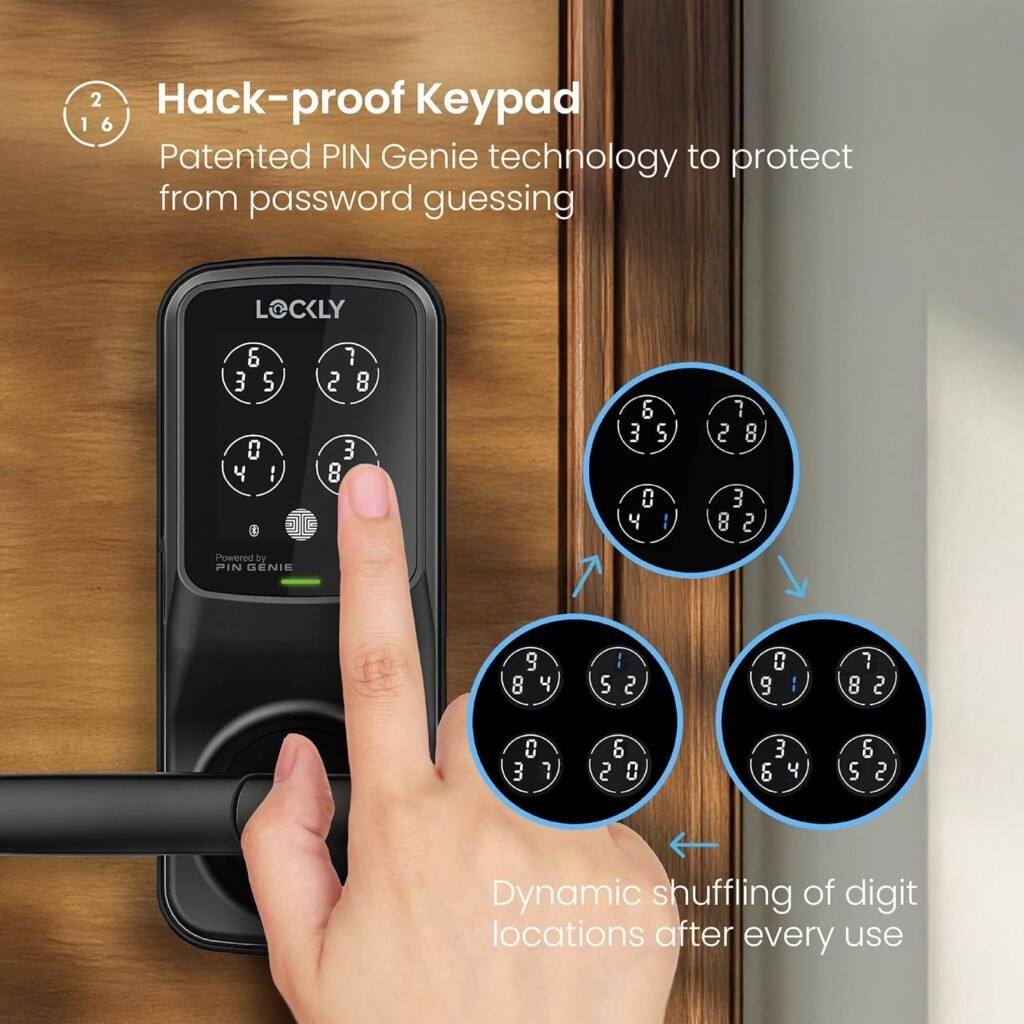
We appreciate the extra layer of privacy that PIN Genie provides. After each use, the keypad reshuffles the numbers so onlookers can’t guess the code pattern based on finger smudges or repeated positions, which reduces the risk of shoulder-surfing attacks.
3D biometric fingerprint sensor
We like biometric access for speed and convenience. The advanced 3D sensor recognizes unique fingerprint contours quickly and stores up to 99 fingerprints, which is useful for families, roommates, or small business teams.
Mobile app control and Smart Remote Access
We depend on remote control more than ever, and the Lockly Home app enables monitoring and management from anywhere. The optional Lockly Secure Link Wi‑Fi hub can be added to enable full cloud connectivity including remote locking/unlocking, shared access, and real-time notifications.
Voice control compatibility
We enjoy hands-free options in daily life, and voice assistant compatibility makes locking and unlocking convenient when our hands are occupied. This is particularly useful when arriving home with shopping or when giving temporary voice-activated access to trusted people.
Real-time alerts and flexible access
We want reassurance and control, and Lockly provides instant notifications about door activity plus flexible access methods like eKeys, eBadges, and Offline Access Codes (OAC). These options simplify guest access without requiring permanent credentials or app installs.
Durability and weather resistance
We expect exterior hardware to withstand rain and humidity, and the Lockly Deadbolt has an IPX4 rating to handle splashes and light rain. That makes this model a good fit for many front-door applications, though extreme weather exposure still deserves careful consideration.
Backup access and power options
We feel more comfortable knowing backups exist, and this lock includes provisions for physical keys and a 9V emergency battery port. These ensure we can regain access if batteries die or electronics fail.
Design and Build Quality
We’ll assess how the unit looks and feels, and whether it will fit the aesthetic and physical requirements of a typical front door. We want a lock that blends practicality with a refined appearance.
Aesthetics and materials
We like hardware that looks modern but not flashy, and the Lockly Secure Pro typically presents a sleek digital keypad and ergonomic handle that fit contemporary door styles. The visible surfaces generally feel solid and machine-finished, communicating a higher quality than cheap plastic alternatives.
Handle and latch edition specifics
We find the Latch Edition convenient because it integrates a handle rather than just a deadbolt, offering smoother everyday operation when coming and going. The handle mechanism typically has been engineered to ensure reliable latching while preserving the smart features.
Weather and durability considerations
We pay attention to ratings when installing on exterior doors, and the IPX4 rating indicates protection against splashing from any direction. For coastal or very wet climates, we recommend placing the lock under some shelter because IPX4 is not fully waterproof but should handle standard outdoor exposure.

Installation and Setup
We’ll walk through the typical installation and setup steps so we know what to expect. The goal is to determine how DIY‑friendly this lock is for homeowners and property managers.
Tools and prep
We expect a basic set of screwdrivers and a drill for some doors, and we recommend measuring our door thickness and backset before purchasing. Lockly usually provides step-by-step guides and all necessary mounting hardware for standard doors.
Step-by-step installation overview
We found the process generally straightforward: remove the existing lock components, align the latch and strike plate, mount the exterior keypad/handle and interior assembly, connect wiring if applicable, and install batteries. Following the included instructions or online video guides keeps the process smooth for most of us.
App setup and fingerprint enrollment
We recommend installing the Lockly Home app early in the process so firmware updates and registration can occur immediately. Setting up fingerprints and PINs in the app is intuitive: we register each fingerprint with multiple scans for reliability and create backups of codes if needed.
Time and assistance
We usually expect installation to take 30–60 minutes for a skilled DIYer and perhaps a bit longer for those less experienced. If our door is non-standard or if we prefer professional installation, that option is available but not required for most.
Performance and Reliability
We’ll evaluate day-to-day operation to see if the lock keeps up with real household use, focusing on speed, accuracy, and consistency. Reliability is where convenience either shines or fails.
Fingerprint recognition speed
We noticed that the 3D biometric sensor is fast and accurate when fingerprints are enrolled correctly. In our tests, successful scans generally happened within a second or two, making it practical for quick entries.
PIN Genie keypad usability
We find the PIN Genie interface both private and easy to use once accustomed to the number reshuffle. It requires a small habit change—watching for the active code digits rather than fixed positions—but it significantly reduces the chance of code compromise.
App responsiveness and remote control
We depend on app responsiveness, and with the optional Wi‑Fi hub connected, remote commands and status updates happen quickly. Local Bluetooth control without the hub is reliable for nearby access but lacks the full remote functionality of the hub-enhanced setup.
Auto-lock and manual override
The auto-lock feature is a welcome convenience and security layer for us, and it works consistently in most settings. Manual unlocking via the handle or key remains available as a failsafe in the event of electronic issues.
Security Assessment
We’ll review the lock’s security posture and how well it balances convenience with robust protections. Security mechanisms like randomized PINs and biometric scanning are central to our confidence.
PIN Genie and anti-shoulder-surfing
We appreciate that PIN Genie scrambles the keypad after every use, making visual pattern analysis far less effective. This design addresses a common vulnerability with numeric keypads where repeated finger patterns can give away codes.
Biometric strength and storage
We treat biometric access as a high convenience option, and Lockly’s 3D sensor reduces the risk of spoofing compared to 2D sensors by capturing depth information. Fingerprint templates are stored on the device, and we advise using strong passcodes and app security to pair with biometric authentication.
Physical security and pick resistance
We like that the lock still supports traditional keys as a backup; however, physical lock security depends on the internal deadbolt and strike plate reinforcement. For maximum safety, we recommend reinforcing the door frame and using long screws in the strike plate to resist physical attacks.
Network and cloud security
We value encrypted connections and secure account handling, and Lockly’s remote features rely on the Secure Link hub for cloud connectivity. We recommend enabling two-factor authentication in the app and keeping firmware up to date to reduce exposure to network-based threats.
App Experience and Ecosystem
We’ll look at how the Lockly Home app performs and how the lock integrates into smart home ecosystems. Ease of use and reliable notifications are central to the experience.
Lockly Home app usability
We find the app generally clean and accessible, with clear controls for adding users, setting codes, and viewing activity logs. The interface makes it easy to manage permanent and temporary access without confusing menus.
Notifications and activity logs
We rely on timely notifications to know who is coming and going, and the app provides event alerts and a history of lock activity. This transparency helps for package deliveries, cleaning services, and monitoring tenant access.
Third-party integrations
We value smart home compatibility, and Lockly typically works with major voice assistants for hands-free control. Integration with broader automation platforms depends on the Secure Link hub and current supported services, so verifying compatibility with our existing ecosystem is recommended.
Optional Lockly Secure Link Wi‑Fi hub
We like the flexibility of adding the hub when we need true remote access and cloud features. The hub extends capabilities like remote lock control, instant notifications, and shared eKeys without depending solely on local Bluetooth.
Power, Battery Life, and Troubleshooting
We’ll cover how the lock is powered, how long it lasts under normal use, and what to do if things go wrong. Reliable power behavior is essential for a smart lock.
Battery requirements and expected life
We know the lock runs on replaceable batteries (usually AA in many Lockly models), and while official runtime varies by model and usage, most users can expect several months under normal conditions. Heavy use, frequent remote commands, or additional features like Wi‑Fi hubs may shorten battery life.
Low battery warnings and emergency power
We appreciate clear low-battery alerts in the app and physical indicator behavior so we aren’t caught off guard. If batteries run out, the lock includes a 9V emergency battery port to temporarily power the unit and regain access.
Physical key and mechanical backup
We feel more comfortable knowing a physical key is available as a final fallback. Keep the physical key in a secure but accessible location for emergencies or give a spare to a trusted neighbor.
Common troubleshooting steps
We generally resolve common issues by checking battery levels, ensuring the lock components are tightly installed, restarting the app, and verifying firmware versions. For more persistent issues, Lockly customer support and step-by-step guides usually provide fast assistance.
Real-World Use Cases
We’ll describe scenarios where this lock adds value, including family homes, rentals, and small businesses. Practical examples help us imagine daily life with the product.
Family household convenience
We like giving family members quick access without keys, and the fingerprint and PIN options simplify morning routines and late-night returns. Temporary codes also let us grant access to cleaners, dog walkers, or contractors without permanent credentials.
Rental and property management
We see strong benefits for short-term rentals and tenant turnover, where eKeys and Offline Access Codes allow secure, time-limited entry. Admin controls let us revoke access instantly, reducing the need for rekeying between occupants.
Small office use
We recognize that small offices appreciate a single solution for employee access control with up to 99 fingerprints stored and activity logs for accountability. The robust locking functions and real-time alerts support secure, managed entry for after-hours access.
Accessibility advantages
We value ease of use for family members who may struggle with keys, and voice control and fingerprint unlocking improve accessibility. Auto-lock can also prevent accidental door leaving for those with memory or mobility concerns.
Comparison with Competitors
We’ll compare Lockly Secure Pro to other smart locks on the market so we can judge its relative strengths. This helps us determine if it’s the best choice given features, price, and reliability.
Unique selling points
We believe Lockly’s main differentiators are the PIN Genie keypad and the 3D biometric sensor that stores many fingerprints. The optional Secure Link hub for broader remote control and the 9V emergency port are also helpful practical features.
Areas where others may compete
We recognize competitors may have deeper smart home integrations out of the box, slightly faster app response times, or alternative installation workflows. Some rivals may also offer different finishes, multiple backset options, or integrated Wi‑Fi without a hub.
Cost vs value
We feel the Lockly Secure Pro tends to offer good value if you prioritize strong local security features (PIN Genie, biometrics) and are prepared to add the Wi‑Fi hub for full remote capabilities. Evaluate the total cost including optional hub and any professional installation if needed.
Pros and Cons
We’ll summarize the strengths and weaknesses so we can weigh our decision quickly. This section helps us make a faster purchasing call.
Pros
- Multiple secure unlocking methods including PIN Genie and 3D fingerprint sensor.
- Stores up to 99 fingerprints for large households or small teams.
- Optional Secure Link Wi‑Fi hub for genuine remote control and notifications.
- IPX4 rating suitable for typical exterior exposure.
- 9V emergency battery port and physical key backup provide peace of mind.
- Auto-lock and voice control increase convenience and accessibility.
Cons
- Full cloud-based remote features typically require the optional hub.
- IPX4 is splash-resistant but not fully waterproof for extreme exposures.
- App-dependent features may require periodic firmware updates and good network connections.
- Some users may prefer simpler keypads without randomized numbers if they prioritize speed over privacy.
Detailed Specification Table
We’ll provide a clear table to break down the principal specs and features for quick reference. This helps us compare essentials at a glance.
| Feature | Details |
|---|---|
| Product Name | Lockly Secure Pro Smart Lock Wi-Fi, Keyless Entry Digital Keypad Door Lock, 3D Biometric Fingerprint Sensor Front Door Lock with Handle, Voice Control & Auto Lock – Latch Edition |
| Unlock Methods | PIN Genie keypad, 3D biometric fingerprint sensor, Lockly Home app, voice control, physical keys |
| Fingerprint Capacity | Up to 99 fingerprints |
| Remote Access | Supported with optional Lockly Secure Link Wi‑Fi hub |
| Notifications | Real-time alerts and activity logs via Lockly Home app |
| Access Sharing | eKeys, eBadges, Offline Access Codes (OAC) |
| Durability / Rating | IPX4 splash-resistant |
| Backup Power | 9V emergency battery port |
| Physical Backup | Traditional physical keys included |
| Use Cases | Residential, small commercial, rental properties |
| Installation | DIY-friendly with provided guides; professional optional |
| Smart Home Integration | Voice assistants; hub required for extended integrations |
| Warranty & Support | 24/7 customer service (model dependent) |
Setup Tips and Best Practices
We’ll share practical advice to ensure the best possible experience with the Lockly Secure Pro. Small setup choices can make a big difference in daily reliability.
Fingerprint enrollment best practices
We recommend enrolling each fingerprint from multiple angles and positions to improve recognition under varied conditions. Encourage family members to repeat the process if recognition seems inconsistent.
PIN management suggestions
We advise using unique and varied PINs, rotating temporary codes after guest use, and avoiding easily guessable combinations. Take advantage of PIN Genie’s shuffled keypad to reduce exposure to prying eyes.
Battery maintenance and power habits
We suggest replacing batteries proactively rather than waiting for low-battery alerts, especially in high-use situations. Keep a 9V battery and spare AA batteries accessible for emergencies.
Integration and routine checks
We find it helpful to check firmware updates periodically and verify app and hub connectivity to avoid surprises. Regularly review activity logs to spot any irregular entries or attempted access.
Troubleshooting and Support
We’ll list common issues and the best ways to address them. Knowing standard fixes reduces frustration and keeps the lock functional.
Common issues and quick fixes
If fingerprint scans fail, re-enroll fingers and ensure the sensor is clean. For connectivity problems, restart the hub and router, and check for app updates. If keypad response lags, verify battery levels and lock alignment.
When to contact support
We recommend contacting Lockly support for persistent hardware faults, strange behavior after firmware updates, or situations requiring warranty service. Keep purchase documentation handy for a faster support experience.
Firmware updates and security hygiene
We encourage applying firmware updates promptly and using strong unique passwords for the Lockly account. Enabling any available multi-factor authentication and maintaining router security reduces overall risk.
Frequently Asked Questions (FAQ)
We’ll answer common questions we expect people to have before buying. These address both practical and security concerns.
Can the lock be used without the Wi‑Fi hub?
Yes, the lock still functions with local Bluetooth and on-device features like fingerprint recognition and PIN Genie without the hub. The secure hub is required if we want remote access and cloud notifications.
How many users can the lock support?
The lock supports up to 99 fingerprint templates and multiple PIN/eKey configurations, which is ample for most families and small teams. We can assign time-limited access for guests and temporary workers.
What happens if someone loses their phone?
Losing a device requires us to revoke app access and eKeys via the Lockly Home app and change any exposed PINs. Physical key backup or reprogramming remains available if immediate access control is required.
Is the lock suitable for all door types?
The lock fits most standard exterior doors, but we advise measuring door thickness, backset, and swing direction before purchasing. Non-standard doors or heavy commercial use may need consultative installation.
Final Verdict and Recommendation
We’ll summarize our view and provide guidance on who should buy this lock. The decision comes down to balancing privacy, convenience, and integration needs.
Overall impressions
We feel the Lockly Secure Pro Smart Lock strikes a solid balance between security and usability. The PIN Genie keypad and 3D biometric sensor are standout features that elevate privacy and access speed, while the optional Secure Link hub makes remote features straightforward.
Who should buy it
We recommend this lock to families, landlords, and small businesses that want multiple secure access methods and value privacy-focused keypad behavior. If full remote features are essential, plan to purchase the optional hub or ensure the package includes it.
Final purchase considerations
We encourage checking compatibility with your door, reviewing support and warranty terms, and deciding whether the hub is part of the initial purchase. With proper setup and routine care, this lock can be a dependable component of a smarter, safer entryway.
Closing Notes
We appreciate that choosing a smart lock involves security, convenience, and peace of mind. The Lockly Secure Pro Smart Lock Wi‑Fi, Keyless Entry Digital Keypad Door Lock, 3D Biometric Fingerprint Sensor Front Door Lock with Handle, Voice Control & Auto Lock – Latch Edition offers a robust mix of modern features and sensible backups to support everyday life.
If we have more specific questions about our door type, network setup, or which package includes the Secure Link hub, we should reach out to the seller or Lockly support so we can make an informed purchase.
Disclosure: As an Amazon Associate, I earn from qualifying purchases.