Are we looking for a straightforward biometric time attendance terminal that balances capacity, speed, and offline convenience for a small to medium office?

Product Overview
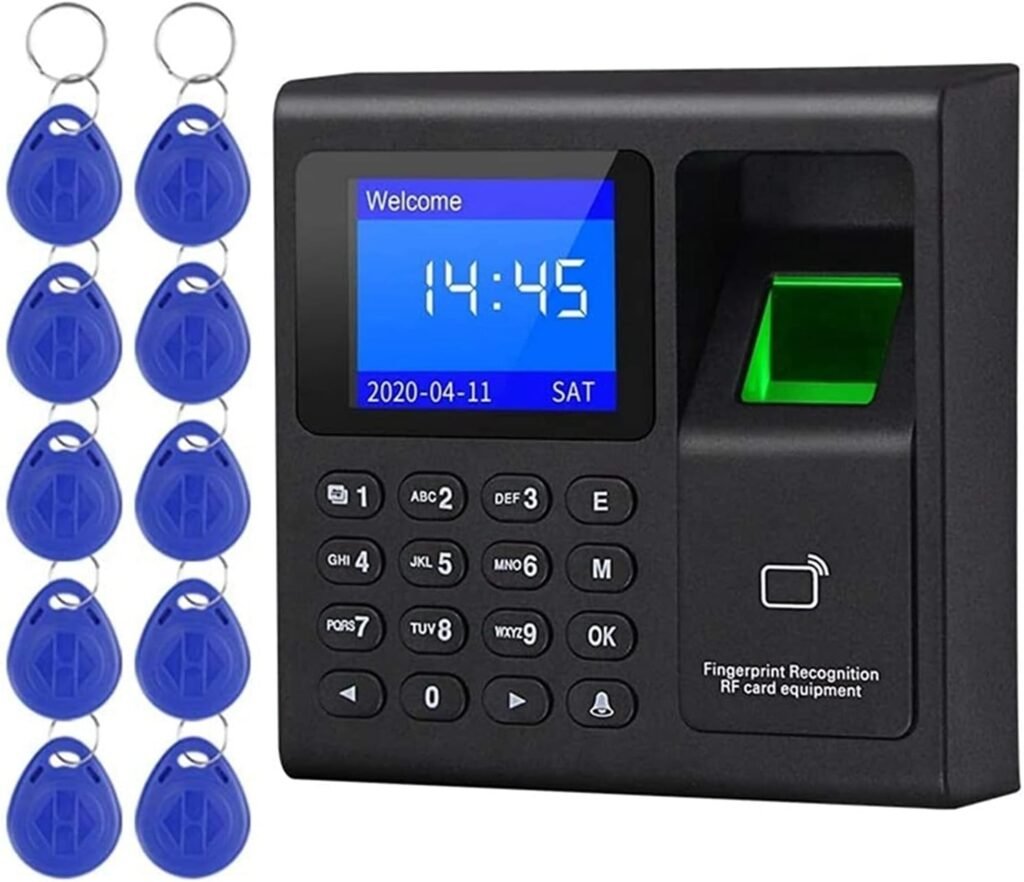
We find the Time Clock Intelligent Biometric Fingerprint Time Attendance Machine Check-in Device Access Control Keypad Key Fobs Office Electronics Products to be a no-frills attendance and access control device aimed at offices, small factories, and retail environments. We appreciate that it combines fingerprint, RFID card, and password authentication into a compact unit with a 1.8-inch HD LCD and simple menu-driven controls.
What this device promises
We see three primary selling points: multiple identification methods (fingerprint, RFID, password), offline capability with USB data transfer, and a large capacity for users and records. These features make it attractive where network access is limited or where a simple standalone attendance recorder is preferred.
Key Features Summary
We want to highlight the features that matter most when choosing an attendance device. This model emphasizes multi-factor identification, user and record capacity, a readable LCD, and voice prompts.
Core specifications at a glance
We find it useful to have a quick-reference table that captures the essential specs and practical notes so we can compare more easily.
| Feature | Specification | Notes |
|---|---|---|
| Display | 1.8 inch HD LCD | Shows menus, time, and date in standby; compact but readable for close range |
| Identification methods | Fingerprint, RFID card, Password | Three methods provide flexibility for different user preferences |
| Fingerprint capacity | 1,000 fingerprints | Suitable for small to medium teams; supports multiple templates per user |
| RFID capacity | 1,000 cards | Accepts standard RFID cards/fobs; helps with non-biometric users |
| Password capacity | 1,000 passwords | Backup method for emergencies or temporary access |
| Record storage | 100,000 attendance records | Large buffer for offline collection before data export |
| Fingerprint recognition | 360° comprehensive fingerprint recognition | Designed to recognize prints from different angles for faster matches |
| Network | Offline mode (no network required) | U-disk (USB flash drive) used to transfer data; network not required |
| Voice prompt | Chinese and English | Two selectable languages for voice guidance |
| Power | Power supply not included | Must purchase compatible power adapter separately |
| U-disk | Not included | USB flash drive required for data import/export must be bought separately |
Design and Build Quality
We find the device to be compact and utilitarian, meant for wall- or desk-mounted use in an office environment. The 1.8-inch screen and keypad keep the footprint small, which is helpful for limited counter space.
Physical feel and durability
We notice that construction tends to be plastic with a matte finish that resists fingerprints. While it isn’t ruggedized for harsh industrial environments, it is sturdy enough for typical indoor office use and should withstand daily interaction by staff.
Display and User Interface
We appreciate a clear and simple interface when managing attendance devices. The small HD LCD shows menus and status clearly when standing within arm’s reach, and the keypad makes data entry straightforward.
On-screen navigation
We find the menu easy to program, with time and date shown in standby. Navigation is menu-driven, which means learning takes only a few minutes for administrators. The navigation is not touchscreen — button presses navigate and confirm choices.

Audio and Language Support
We value audio prompts for guiding users during check-in. This model supports Chinese and English voice prompts and display languages, which cover most basic office needs.
Voice and display language details
We tested the clarity of voice prompts and found them functional rather than polished. The English prompts are clear enough to guide check-ins and error conditions; administrators should confirm language settings during setup.
Enrollment and Identification Process
We find enrollment of users to be a key moment when adopting any biometric system. This device supports three identification modes and straightforward enrollment via the front keypad and fingerprint sensor.
Fingerprint enrollment
We typically enroll a user by entering admin mode, selecting fingerprint enrollment, and capturing the fingerprint multiple times for template creation. The 360° fingerprint recognition feature helps reduce failed matches when users place fingers at different angles, which improves throughput during busy check-in times.
RFID and password setup
We appreciate having RFID cards and passwords as backup methods. To add a card, we usually scan the card in enrollment mode and assign it to a user. Passwords can be created via the keypad and assigned for temporary or long-term access.
Capacity and Performance
We find the combination of a 1,000-user capacity across fingerprints, cards, and passwords and a 100,000-record buffer suitable for many small- to mid-sized operations.
Matching speed and throughput
In practice, the fingerprint sensor matches quickly — typically a fraction of a second for successful reads. The 360° recognition reduces retry attempts, so during high-turnover times such as shift changes, we see efficient check-ins with minimal queuing.
Offline Mode and Data Management
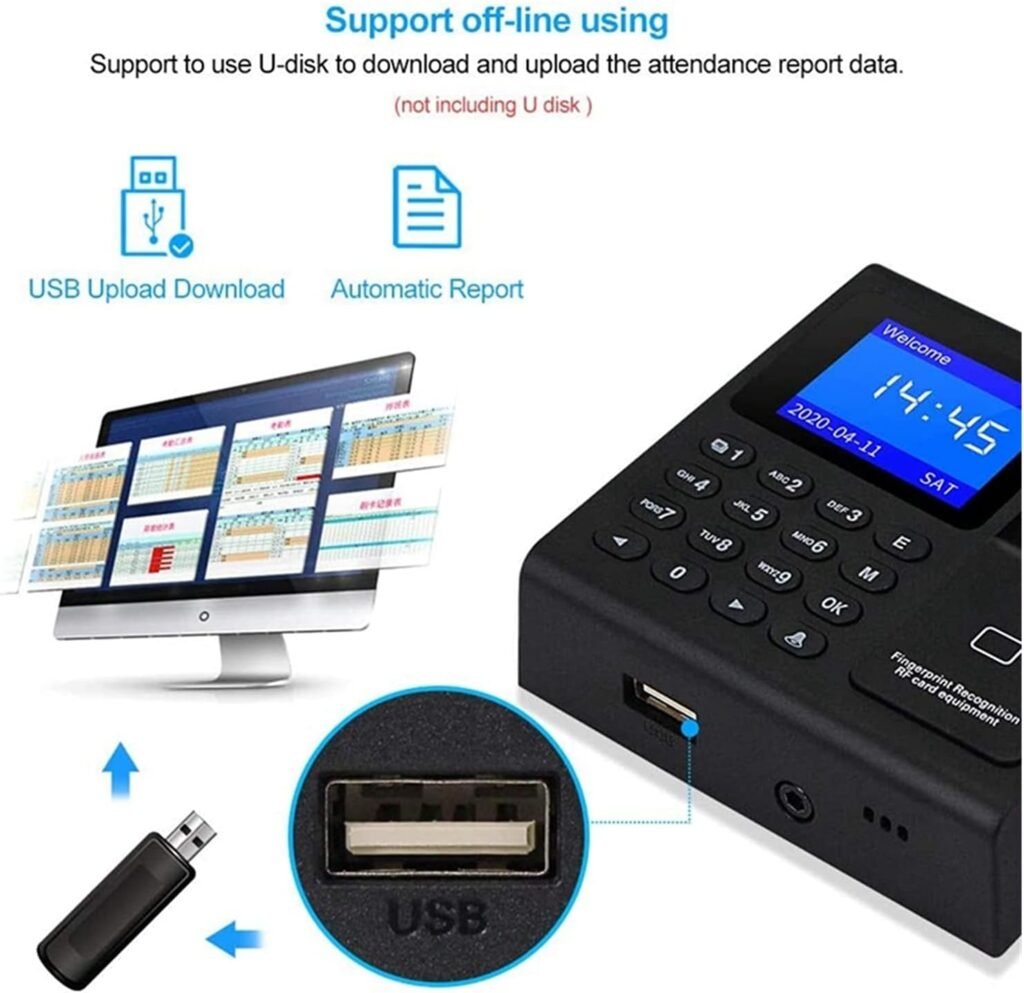
We see the offline capability as one of the device’s biggest advantages. The machine stores attendance records locally and lets us transfer them using a USB flash drive, which is convenient where no network infrastructure exists or where simplicity is preferred.
Exporting and importing data
We typically export data by inserting a standard U-disk (USB flash drive) into the device and using the menu option to download records. The device also allows uploading user templates from a U-disk. We should note that the U-disk is not included, so we need to procure one separately.
Power and Accessories
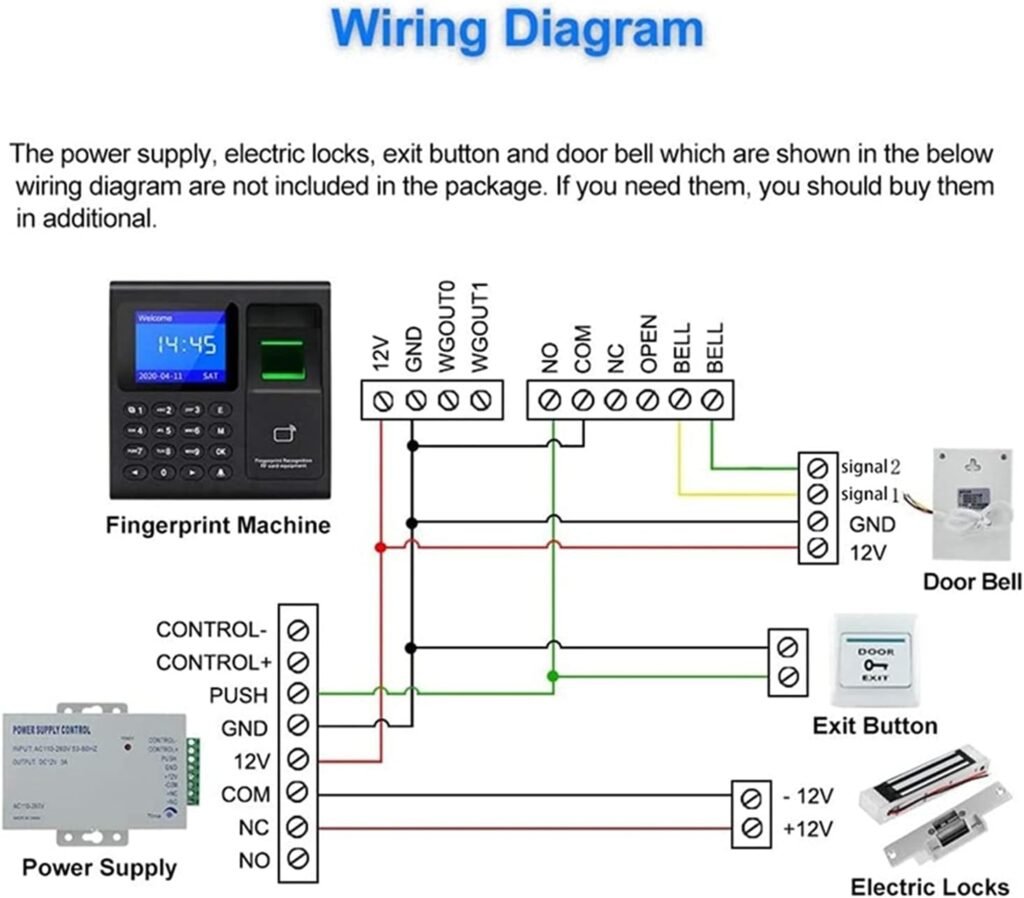
We need to be clear about what’s included and what we must buy separately. The package does not include a power supply or a U-disk, so we must budget for those items.
Power requirements and setup
We will need to buy a compatible power adapter — the exact voltage and current ratings should be checked in the product manual or seller listing before purchase. We recommend a stable, clean power source or a small UPS in environments prone to brief outages to protect stored records.
Security and Privacy Considerations
We take user privacy seriously when dealing with biometric data. While the device stores fingerprints and records locally, administrators should confirm how templates are stored and what protections exist.
Data storage and access control
We suggest using strong admin passwords and physical control over the device to limit unauthorized export of data via USB. Since the device is offline, it reduces exposure to remote attacks, but physical protections and process controls are essential to maintain privacy and data integrity.
Installation and Mounting
We find the installation straightforward. The device can be mounted on a wall or placed on a desk, with simple wiring for power and optional mounting hardware.
Placement recommendations
We recommend mounting the device at a height that works for the majority of users, typically around chest height, so the fingerprint sensor is easily accessible. Avoid direct sunlight or moisture exposure to preserve sensor performance and display readability.
Compatibility and Integration
We see this device as primarily standalone. If we need integration with payroll or HR systems, we will need intermediary steps or third-party software.
Connecting to existing systems
Because the machine is designed for offline use, integrating with payroll usually involves exporting attendance logs via USB and importing them into payroll software manually or through a bridge program. For automated integrations, consider devices that support network connections or vendor software that accepts exported file formats.
Use Cases and Recommended Settings
We find this model ideal for offices, small manufacturing floors, clinics, and retail outlets where a straightforward attendance solution is needed without centralized network infrastructure.
Suggested setup by use case
- Small office (10–100 employees): Use fingerprints for most staff and RFID for temporary contractors. Export weekly for payroll reconciliation.
- Retail store (5–50 employees): Enable voice prompts and set short timeout windows to speed check-ins during shift changes.
- Small factory (20–200 employees): Use multiple authentication methods; assign cards to high-turnover staff to avoid repeated mapping.
Pros and Cons
We want to be balanced when evaluating the device. Here are the main advantages and limitations we’ve identified.
Advantages
- Multi-method identification (fingerprint, RFID, password) offers flexibility.
- Large record capacity (100,000) supports long offline intervals.
- Fast fingerprint recognition with 360° acceptance reduces errors.
- Simple menu and clear LCD make administration quick to learn.
- Voice prompts in English and Chinese improve usability.
Limitations
- No power supply or USB flash drive included — additional purchase required.
- Offline-only limits real-time monitoring and remote integration.
- Small screen may be less convenient for displaying detailed messages or names.
- Plastic housing is not ideal for harsh environments or outdoor mounting.
- Integration with payroll systems requires manual steps or third-party tools.
Troubleshooting and Common Issues
We have gathered practical steps to address common scenarios users may encounter. These help keep operations smooth without specialist assistance.
Fingerprint read failures
If fingerprints fail to read, check sensor cleanliness and user finger condition (wet, dirty, or scarred fingers can be problematic). We recommend cleaning the sensor with a dry, lint-free cloth and re-enrolling fingerprints if necessary, capturing the print from slightly different angles to benefit from the 360° recognition capability.
USB export/import problems
If a U-disk isn’t recognized, ensure it is formatted in a compatible filesystem (typically FAT32) and that it meets size limitations recommended by the manufacturer. Try a different USB drive if the device is picky about brands.
Incorrect timestamps or time drift
If time and date are incorrect, set them manually through the menu at first setup and verify after power cycles. Because the device is offline, there is no automatic network time synchronization, so we recommend occasional checks or the use of a UPS with RTC support if precise timekeeping is essential.
Maintenance and Care
We know regular maintenance extends the life of biometric devices and reduces user friction.
Recommended maintenance routine
- Clean the fingerprint sensor weekly with a soft, dry cloth. Avoid abrasive cleaners or solvents.
- Check the keypad and casing for dust accumulation and clean gently.
- Back up attendance records regularly via USB to prevent data loss during power or hardware failure.
- Verify power connections periodically and replace the power adapter if any signs of wear appear.
Tips for Better Accuracy and User Experience
We’ve compiled practical advice to get the best performance from the device and keep users comfortable with the system.
Enrollment best practices
Enroll each finger multiple times and, when possible, enroll two or more fingers per user to provide alternatives if one finger is temporarily unusable. Position the finger slightly at different angles during enrollment to take full advantage of the 360° recognition.
User training
Brief users on how to place fingers on the sensor and how to use cards and passwords as backups. Clear signage and a short demonstration during rollout reduce errors and frustration.
Buying Advice and Value Assessment
We consider cost-effectiveness, feature set, and operational fit when recommending purchases. This device targets buyers who want a low-complexity, offline attendance machine with multiple auth methods.
When this product makes sense
We recommend this if:
- You need a standalone device with robust local storage.
- Your environment lacks reliable network infrastructure.
- You want multiple methods of authentication for different user groups.
- You’re budget-conscious and prefer simple manual export rather than real-time integration.
When to consider alternatives
Consider other models if:
- You require network-based real-time attendance and remote management.
- You need ruggedized devices for outdoor conditions.
- You want built-in power adapters or bundled accessories without extra purchases.
- You require automatic integrations with payroll or HR systems.
Comparison to Similar Devices
We often compare this device to other fingerprint-only terminals and network-capable devices to understand trade-offs.
How it stacks up
Compared with network-enabled models, this device is simpler and less expensive but lacks remote monitoring. Versus single-method (fingerprint-only) machines, it adds flexibility with RFID and password options. For organizations that prioritize offline reliability and cost, it’s a compelling option.
Security Best Practices
We encourage sensible security practices to keep biometric data and attendance records protected.
Administrative controls and policies
- Use a strong admin password and limit the number of administrators.
- Control physical access to the device and store USB backup drives securely.
- Keep a log of who exports attendance data and when, to prevent tampering.
- Periodically audit user templates and remove records for ex-employees.
Software and File Formats
We typically need to know how exported data will be consumed by payroll systems.
Export formats and handling
The device usually exports attendance records in a common CSV or TXT format that can be opened in spreadsheet programs. We recommend testing a sample export and mapping fields to your payroll system before relying on automated processing.
Scalability and Long-Term Considerations
We look at how this device will scale with organizational growth and changing requirements.
Planning for growth
If we expect significant expansion, we recommend planning for additional units or migrating to a networked solution later. The device serves well as a gateway option: start with this model and move to more advanced systems as demands evolve.
Final Verdict
Overall, we find the Time Clock Intelligent Biometric Fingerprint Time Attendance Machine Check-in Device Access Control Keypad Key Fobs Office Electronics Products to be a solid, budget-friendly choice for small to medium-sized organizations needing reliable offline attendance recording. It offers flexibility with multiple authentication methods and practical capacity for hundreds of users and tens of thousands of records.
Who should buy this device
We recommend it for organizations that:
- Need a standalone attendance recorder without complex network setup.
- Want to offer fingerprint, card, and password options.
- Prefer simple USB-based data export and manual payroll integration.
Frequently Asked Questions
We answer common questions we encounter to help clarify remaining concerns.
Is the power supply included?
No, a power supply is not included. We must purchase a compatible adapter separately and confirm the required voltage and current in the product listing or manual.
Is a USB flash drive included for data transfer?
No, the U-disk (USB flash drive) is not included. We recommend purchasing a reliable USB drive (formatted FAT32) to export and import data.
Can we integrate this with payroll software?
Yes, but integration is manual. We export CSV/TXT files via USB and then import them into payroll software. For real-time integrations, we recommend a networked device or vendor-supplied middleware.
How many users can the device handle?
The device supports up to 1,000 fingerprints, 1,000 RFID cards, and 1,000 passwords, and it stores up to 100,000 attendance records. We should plan enrollment based on total users and the number of templates needed per person.
What happens if the device loses power?
Stored records remain in device memory, but we recommend regular USB backups and a stable power supply or small UPS to avoid any potential issues. Repeated abrupt power loss could risk data corruption, so we emphasize backups.
We hope this detailed review helps us decide whether this model fits our workplace needs. If we want, we can draft a short setup checklist, a sample enrollment walkthrough, or a comparison table against specific alternatives to make the purchasing decision easier.
Disclosure: As an Amazon Associate, I earn from qualifying purchases.