?Are we ready to assess the HID 921NTNNEK00000 RK40 iCLASS SE Smart Card Reader with Keypad for our access control projects and daily operations?

Product Overview
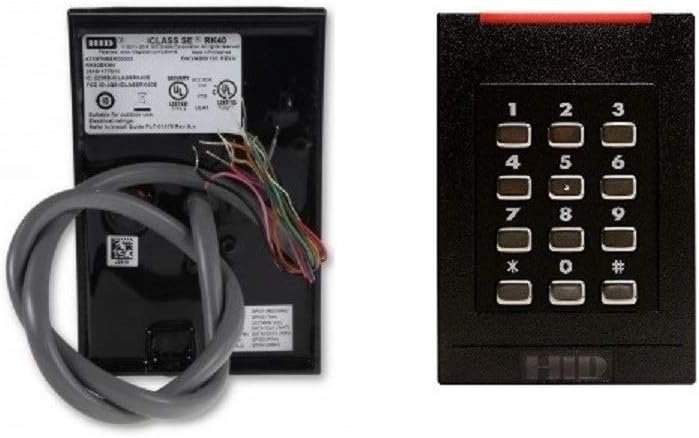
We like to begin by summarizing what this device is and why it might matter for our installations. The HID 921NTNNEK00000 RK40 iCLASS SE Smart Card Reader with Keypad is a wall-mounted reader intended for physical access control, combining an iCLASS SE-compatible reader with a numeric keypad for PIN entry. We find that this model is described as new from HID Global and is designed to work with SIO (Secure Identity Object), SEOS, and legacy iCLASS credentials, while not supporting traditional proximity-only (prox) tokens.
What the Product Claim Means in Plain English
We want clarity, so we rewrite the technical claims into straightforward terms. The unit is a modern multi-technology reader that supports secure credential types used in enterprise environments and can accept both smart card and PIN-based authentication. We note that because it does not support “prox” only credentials, older low-frequency proximity cards that lack iCLASS or SEOS capabilities will not function with this reader.
Key Features at a Glance
We always check core features first to see if the device fits our needs. The RK40 model integrates iCLASS SE technology, supports SIO and SEOS, includes a keypad for multi-factor authentication, and is intended for surface mounting near doors or gates. We value that HID Global positions this as a secure reader for modern deployments where organizations want to use a mix of secure smart credentials and PINs.
Why These Features Matter
We believe functions like SIO and SEOS support reduce the risk of credential cloning and enable mobile and cloud-based identity workflows. The keypad gives us an extra layer of authentication and flexibility for sites that require PINs or dual-factor entry, improving both security and policy compliance.
Detailed Specifications
We prefer a clear list of technical specs so we can match the reader to our technical requirements. Below we outline the important specifications, including form factor, credential types, and typical operating parameters. We also clarify items that frequently cause confusion, like the “NO PROX” note in some listings, which indicates the reader does not accept legacy prox-only credentials.
| Feature | Specification | Notes |
|---|---|---|
| Model | HID 921NTNNEK00000 RK40 iCLASS SE | Full model number per HID Global |
| Credential support | iCLASS SE, SEOS, SIO, legacy iCLASS | Does not support low-frequency prox-only tokens |
| Form factor | Wall-mounted, vertical reader with keypad | Designed for indoor/outdoor proximity mounting |
| User interface | 12-key numeric keypad | Supports PIN entry and multi-factor authentication |
| Communication interface | Wiegand, OSDP or other HID-compatible interfaces (varies by kit) | Confirm factory configuration for specific interface |
| Power | Typical access control reader power requirements (12VDC typical) | Check installation guide for exact power draw |
| Environmental | Weather-resistant housing (industry standard) | Verify IP rating for specific deployment needs |
| Additional features | Secure firmware and cryptographic support | SIO and SEOS provide secure object-based credentials |
We include these details because they give us the practical information we need to integrate the reader with controllers, power sources, and mounting surfaces.

Compatibility and Credential Support
We always verify compatibility to avoid surprises during deployment. This RK40 reader is intended to work with HID’s secure credential ecosystems — iCLASS SE (secure contactless smart card), SEOS, and Secure Identity Object frameworks — as well as legacy iCLASS cards when supported. We must confirm whether the installed system expects legacy prox-only cards because those will not function with this model.
Mobile and Cloud Credential Use
We appreciate that SEOS and SIO provide pathways for using mobile credentials and cloud-based identity management. This means we can manage credentials centrally and distribute secure credentials to smartphones or wearable devices if our system and software support it. We recommend verifying that our access control management software is configured for SEOS and SIO workflows to make the most of the reader’s capabilities.
Installation and Mounting
We prefer readers that are straightforward to mount and wire, and this RK40 is designed for standard wall mounting near entrances. The unit typically mounts over a single-gang or surface-mount backbox and requires low-voltage wiring to the access control panel or reader interface module. We advise checking the wiring diagram and ensuring power, data, and any tamper circuits are correctly connected prior to finalizing the installation.
Wiring and Interface Notes
We always verify the communication interface (Wiegand, OSDP, RS-485, etc.) prior to installation so we can route the correct cables and terminate properly. In mixed-technology sites, we recommend labeling wires and documenting endpoint addresses to speed troubleshooting and future maintenance.
Security Features
We prioritize readers that provide hardware and firmware protections against tampering and credential cloning. The RK40 benefits from HID’s secure credential technologies (iCLASS SE, SEOS, SIO) that use strong cryptographic protection and secure key management. We value these protections because they reduce the attack surface compared with simple prox readers that rely on static card identifiers.
PIN and Multi-Factor Authentication
We like that the keypad enables PIN entry, which can be combined with a credential for two-factor authentication. This is helpful for high-security areas or when we need to enforce policies like “card + PIN” for certain groups or times of day. We should ensure that our access control software supports configuring multi-factor rules and that PINs are managed according to our operational policies.
User Experience and Keypad Functionality
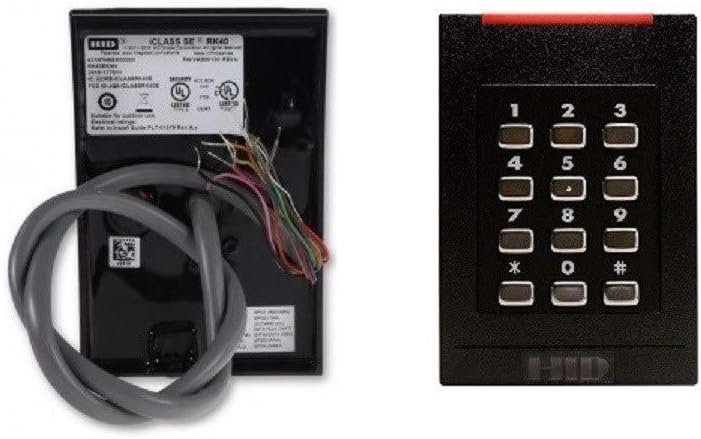
We take the usability of the keypad seriously because it affects daily throughput and acceptance. The RK40’s keypad provides tactile feedback and a layout us personnel will be familiar with, improving ease of use for staff and visitors. We recommend testing the ergonomics during a pilot phase to verify that keypad illumination and responsiveness meet expectations in our environmental conditions.
Accessibility and Feedback
We look for keypad features such as audible beeps, LED indicators, and tactile surfaces to help users confirm input. These cues are important for users with different levels of familiarity and in noisy or poorly lit areas. We also suggest that we plan for accessibility accommodations if required by local codes or user needs.
Performance and Reliability
We want readers that operate reliably across seasons and under daily use, and HID products typically meet industry reliability standards. The RK40 is engineered for frequent use and is expected to handle a high number of daily transactions with minimal latency. We should perform lifecycle testing in high-traffic locations to validate expected MTBF (mean time between failures) under our specific workload.
Environmental Resistance and Durability
We prioritize readers with robust housings and environmental seals for outdoor or semi-exposed locations. While many HID readers are designed to resist dust and moisture, we must confirm the specific IP or NEMA ratings for our deployment to ensure longevity in harsh conditions. Routine maintenance schedules and environmental seals will extend service life.
Integration with Access Control Systems
We favor readers that integrate cleanly with our existing controllers, card management systems, and identity management platforms. The RK40 typically interfaces with standard access control panels via common protocols, but we must verify the exact model-specific wiring and supported protocols for compatibility. We also recommend confirming firmware versions and updating management software to accommodate newer credential formats like SEOS.
Software and Credential Encoding
We normally handle credential provisioning through our centralized access management software or a credential issuance system. For SEOS/SIO workflows, we should ensure that our software supports secure object creation and lifecycle management, including revocation and token replacement. If we plan to use mobile credentials, we need to arrange for a trusted credential management partner or a compatible mobile credential platform.
Setup and Configuration Steps
We like to prepare a step-by-step plan for initial setup to minimize downtime and errors. Typical steps include mounting the reader, connecting power and data cabling, configuring the communication protocol on both the reader and controller, testing credential read and PIN entry, and finally documenting the configuration. We should also enroll initial users and perform acceptance tests to confirm correct operation.
Common Pitfalls During Setup
We often see issues arise due to incorrect wiring, mismatched protocol settings (e.g., expecting Wiegand when the panel uses OSDP), or unsupported credential types. We recommend confirming the existing credential type in use across the site, coordinating with IT for any networked reader components, and validating keypad behavior before finalizing installation.
Maintenance and Troubleshooting
We prefer predictable maintenance routines and clear troubleshooting steps to keep access control systems running smoothly. For the RK40, routine checks should include cleaning the reader surface, verifying keypad response, testing read range with known good credentials, and checking wiring and tamper circuits. We keep a record of firmware versions and schedule updates in controlled maintenance windows to avoid disrupting operations.
Troubleshooting Tips
We find that many common problems are resolved by verifying power continuity, checking cable terminations, confirming protocol settings, and testing with multiple credential types. If the reader fails to read iCLASS SE or SEOS credentials, we check for credential provisioning issues in the management system and confirm that the reader’s firmware supports the credential type. Contacting HID Global support with logs and firmware details can expedite resolution when more complex firmware or encryption issues occur.
Pros and Cons — Balanced Assessment
We always present both strengths and limitations to help us decide. The RK40’s strengths include modern secure credential support, keypad-based multi-factor authentication, a durable form factor, and enterprise-focused features that integrate with HID ecosystems. On the downside, it does not support legacy prox-only credentials, and we must confirm communications and firmware compatibility before purchase to avoid integration headaches.
When the Cons Matter Most
We should be cautious in environments where many users still rely on prox-only tokens; those cards will not function with this reader and would require replacement or a second reader type. If our access control system or integrator does not fully support SEOS or SIO, we may not realize the reader’s full benefits and could face extra integration work.
Use Cases and Deployment Scenarios
We like to map products to real-world uses so we can decide where this model fits best. The RK40 is well suited for enterprise office entrances, secure labs, server rooms, parking control points with staff access, and any door that requires card + PIN authentication. We also consider it for retrofit projects where organizations plan to transition to mobile or secure credentials over time.
Ideal Customer Profiles
We think organizations that already use HID iCLASS or plan to migrate toward mobile credentials and cloud-based identity management will get the most value. Facilities that require two-factor card + PIN authentication for compliance or elevated security zones will find the keypad especially useful.
Comparison with Alternatives
We find it helpful to compare the RK40 to other HID readers and competitive products to understand relative value. Compared to legacy prox readers, the RK40 offers stronger cryptography and mobile credential readiness but demands credential upgrades. Against other secure readers, it competes well on features and HID ecosystem compatibility, though specification details like communication interfaces and environmental ratings vary across models.
Cost and Total Cost of Ownership
We consider not only sticker price but the total cost of ownership including credential replacement, maintenance, integration, and lifecycle support. Upgrading to SEOS/SIO may require replacing old cards or provisioning mobile credentials, but the improved security and manageability often justify the initial investment. We recommend building a migration plan to stagger upgrades and control expenses.
Regulatory and Compliance Considerations
We value readers that help meet regulation-driven security needs, such as data center access controls, healthcare privacy rules, and corporate security policies. Using secure credentials and multi-factor methods can assist in meeting audit requirements and reducing liability associated with unauthorized access. We must document credential issuance, lifecycle events, and access logs to satisfy auditors and compliance standards.
Audit Trail and Logging
We expect the reader itself to provide transaction data to the access control system, which then stores audit trails. Ensuring that our controllers and software keep immutable logs and support export for retention and review is part of a compliant deployment strategy.
Purchasing and Warranty
We usually check warranty terms, support options, and authorized reseller channels before buying security hardware. HID Global typically offers manufacturer warranties and support, but warranty length and coverage can vary by product and region, so we should confirm these details with our vendor. Buying through authorized channels also helps us ensure firmware authenticity and access to updates.
What to Ask the Vendor
We advise asking about the reader’s factory interface settings, included mounting accessories, firmware version, and whether the part includes keypad configuration or requires field programming. Clarifying whether the unit includes tamper hardware or external backboxes can prevent unexpected additional purchases.
Final Thoughts and Recommendation
We conclude that the HID 921NTNNEK00000 RK40 iCLASS SE Smart Card Reader with Keypad is a solid choice for organizations moving toward secure credential ecosystems and needing keypad-enabled multi-factor authentication. We recommend it when security, modern credential support, and HID ecosystem integration are priorities, and when the environment can accommodate a migration away from legacy prox-only credentials. We suggest planning for credential provisioning, firmware validation, and integration testing to ensure a smooth rollout.
Summary Action Steps for Deployment
We propose these practical next steps: verify compatibility with our access control panel and management software, confirm user credential types and migration plans, schedule pilot installations to test keypad ergonomics and read range, and coordinate firmware updates and training with our integrator. Following these steps will help us minimize surprises and maximize the RK40’s operational benefits.
We welcome questions about specific integration details, configuration examples, or how this reader fits within our broader access control architecture, and we can prepare further documentation or checklists for our installation teams on request.
Disclosure: As an Amazon Associate, I earn from qualifying purchases.