Have you been searching for a smart safe that gives us keyless convenience without compromising real security?

Product Overview
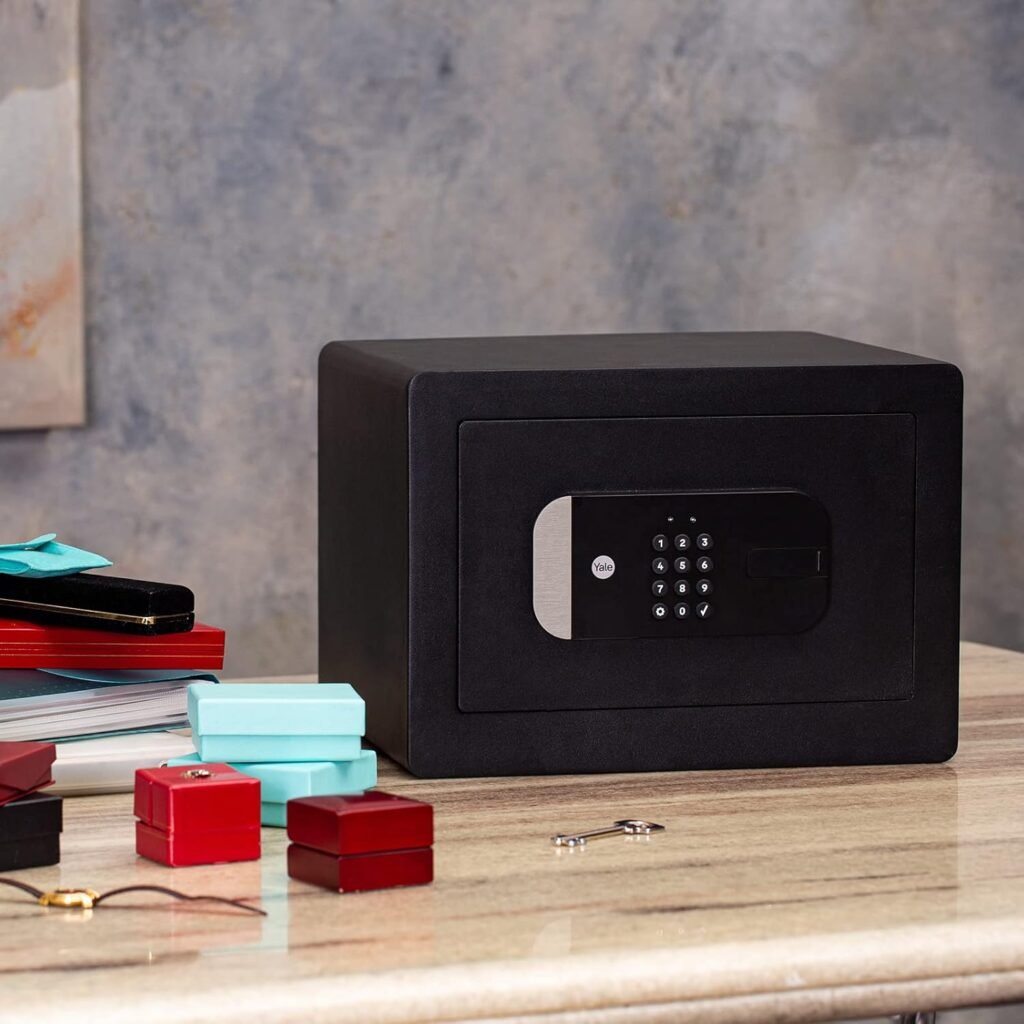
We tested the Yale Smart Safe – Wi-Fi Safe for Secure, Keyless Access to see how well it balances convenience, connectivity, and protection. This smart safe offers multiple unlocking methods, app-based control from anywhere with the included Yale Connect Wi‑Fi Bridge, and features designed to make daily use straightforward — like a door-activated light and interior hooks for hanging small valuables.
Key Features
We want to highlight the primary features so we can quickly understand what this safe offers and how it compares to simpler alternatives. Below is a concise breakdown of the most important functions and the real-world value they add.
| Feature | What it does | Why it matters |
|---|---|---|
| Built-in keypad | Enter a numeric code to unlock | Fast, keyless access for family members and trusted users |
| Physical key | Traditional mechanical key override | Backup access in case of battery or electronic failures |
| Yale Access App compatibility | Unlock and manage the safe from a smartphone or Apple Watch | Remote control, access sharing, and activity history |
| Remote access via Yale Connect Wi‑Fi Bridge | Connects the safe to the cloud for anywhere access | Control and monitor the safe from any location |
| Voice assistant support | Works with Alexa, Google Assistant, and Siri | Hands-free status checks and unlocking (where supported) |
| Door-activated light | LED light turns on when the door opens | Makes it easier to find and organize items inside |
| Interior hooks | Built-in hooks for keys and small items | Keeps frequently used items accessible and organized |
| Activity history | Logs who accessed the safe and when | Useful for accountability and tracking access |
Design and Build Quality
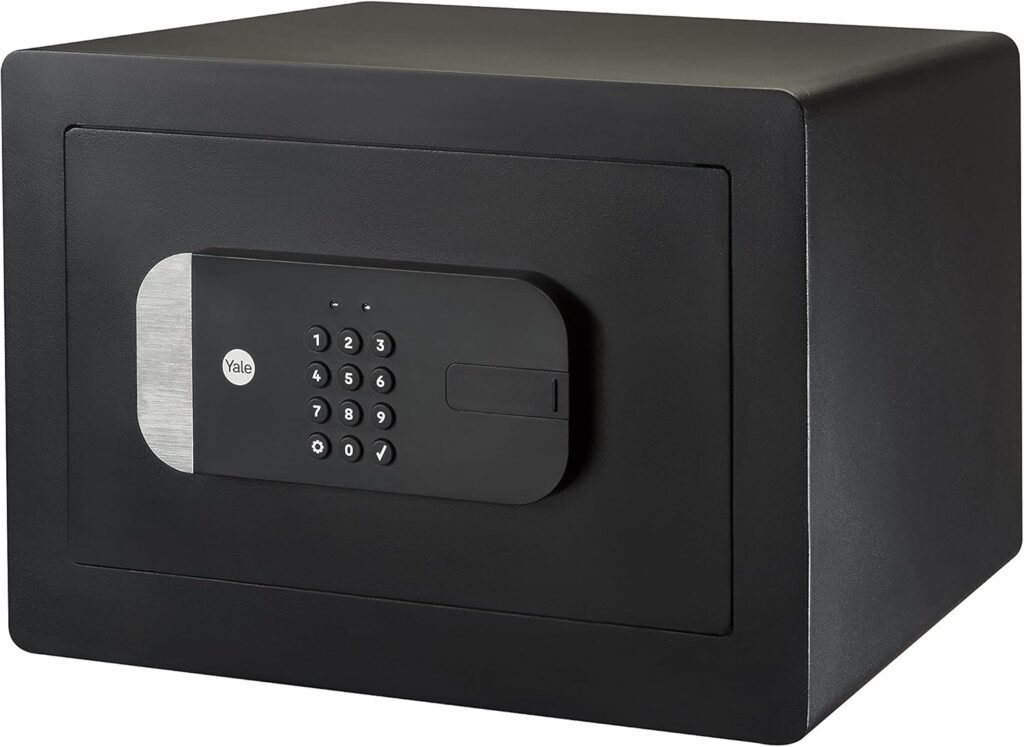
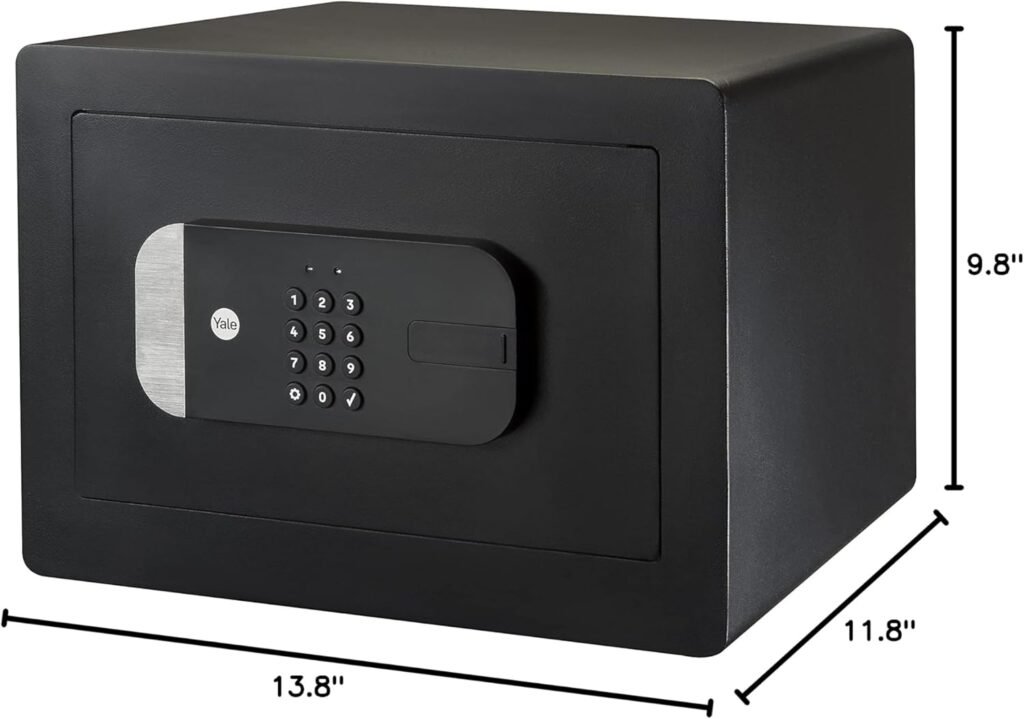
We expect a safe to feel solid and durable, and we judged this model with that expectation in mind. The Yale Smart Safe combines a compact footprint with a rugged feeling that suits home use for documents, cash, jewelry, and small electronics.
Exterior and Materials
We noticed that the exterior finish strikes a balance between discreet and premium, so it won’t draw unwanted attention but still looks sturdy. The body feels robust, with a metal shell that reduces flex and resists casual tampering.
Interior and Organization
Inside, we found a thoughtfully designed space that helps us keep small items tidy. The door-activated light and included hooks immediately improve usability by preventing fumbling and providing easy hanging for keys or lanyards.

Setup and Installation
We tested the unboxing and initial setup to see how quickly someone without technical expertise could get started. The process involves both physical placement and app configuration, and the Wi‑Fi Bridge plays a key role if remote control is required.
Unboxing and What’s Included
We appreciated that the package includes the safe, a physical override key, interior hooks, mounting hardware, and the Yale Connect Wi‑Fi Bridge necessary for remote access. Clear instructions and a simple hardware kit helped make the initial steps straightforward and approachable.
Physical Installation
We found the safe is lightweight enough for placement on a shelf but heavy or boltable enough to discourage opportunistic theft when secured properly. If we wanted to bolt it to the floor or a wall, the mounting holes and included hardware make that straightforward. Placement is flexible: a closet shelf, a nightstand, or a home office cabinet all work well.
App Setup and Yale Connect Wi‑Fi Bridge
We linked the safe to the Yale Access App and the Yale Connect Wi‑Fi Bridge to enable remote features. App setup required creating an account, following the prompts to add a device, and pairing the bridge to our home Wi‑Fi network. Once the bridge was online, the safe paired quickly and remote functions became available. We recommend keeping the bridge within good range of both the router and the safe to ensure stable connectivity.
Access Methods
We found the variety of access methods one of the most practical aspects of this model. Each option suits different situations, and having multiple redundancies increases our confidence in daily usability.
Keypad and Physical Key
We used the built-in keypad for daily unlocking and found it responsive with clearly labeled buttons. The mechanical key provides an essential fallback, and we appreciated that it’s included rather than being sold separately.
Yale Access App and Apple Watch
We controlled the safe via the Yale Access App from our phones and even tested the Apple Watch unlock option. The app lets us lock/unlock remotely (when the bridge is connected), create and manage user codes, and see recent activity. The Apple Watch feature is handy for quick checks or when our phones aren’t immediately available.
Voice Assistant Integration
We integrated the safe with Alexa, Google Assistant, and Siri to test voice commands and status inquiries. Voice commands are convenient for checking whether the safe is locked or requesting a lock, though we recommend using voice in conjunction with app-based controls for stronger security practices — voice activation can be locked down or limited based on preference.
Remote Access and Sharing
We relied heavily on the remote features during our testing period, and these proved especially useful for sharing access with guests or service personnel without providing a physical key.
Remote Control and Access Sharing
With the Yale Connect Wi‑Fi Bridge in place, we unlocked and relocked the safe from across town through the app. We also created temporary access codes for visitors and revoked them when access was no longer needed. Sharing access through the app is quick and trackable, which is useful for short-term arrangements like housekeeping or urgent deliveries.
Activity and Access Logs
We checked the history logs to review who accessed the safe and when. The app timestamps entries and identifies the method of access (keypad code, app, or key), which gives us peace of mind and a practical way to audit use over time.
Security and Encryption
We scrutinized both the physical and digital security aspects to assess how well the safe protects our valuables and data. Security is multi-layered here: hardware strength alongside app and cloud protections.
Locks and Hardware Security
The safe’s locking mechanism feels solid and provides reliable resistance to casual tampering. Having a physical key override is a useful safety net, and the rugged construction discourages opportunistic attacks. For maximum security, we recommend bolting the safe down when possible.
Digital Security and Privacy
We examined the app and cloud features to understand how our data and access keys are handled. Yale uses encryption for communications between the device, bridge, and cloud, and account-based login controls protect against unauthorized app access. We also recommend enabling two-factor authentication where available and managing user permissions carefully.
Performance and Reliability
We examined day-to-day responsiveness, battery life, and connection reliability to see if the safe would perform well under regular use. These practical considerations determine whether a smart safe enhances convenience without creating new frustrations.
Lock Response and Battery Life
We found the lock to respond quickly to keypad entries and app commands when local connectivity was strong. Battery life depends on usage patterns and how often the lock cycles; during our testing period, batteries provided reliable operation for weeks. The app alerted us when battery levels dropped, which helped prevent lockouts.
Connectivity and Wi‑Fi Bridge Reliability
The Yale Connect Wi‑Fi Bridge is the key to remote functionality, and its reliability hinges on placement and router performance. We experienced stable remote access when the bridge had a strong signal to both the router and the safe. If your home Wi‑Fi is spotty, you may need to adjust router placement or add a mesh node to ensure consistent connectivity.
Daily Use and Practicality
We focused on how the safe fits into daily routines, including how intuitive controls are and how storage features like light and hooks improve usability.
Using the Door-Activated Light and Hooks
The door-activated light is a surprisingly helpful feature for late-night access; it turns on instantly when the door opens and illuminates the interior without fumbling for a flashlight. The interior hooks are ideal for hanging keys or small pouches, which keeps frequently used items visible and ready.
Organization and Capacity
We found the internal volume suitable for a mix of small to medium valuables: passports, cash, jewelry, a small hard drive, and a few documents fit comfortably. If you need to store larger binders or oversized items, this model may be limiting; however, for everyday valuables, its size is well balanced between discretion and storage capacity.
Pros and Cons
We weighed the strengths and limitations so we can help decide if this model suits different needs and households. Below we summarize the main advantages and trade-offs based on our testing.
Pros
We found several strong points that make this safe appealing for many users:
- Multiple access methods for flexibility and redundancy. We like having keypad, key, app, and voice options.
- Remote control and sharing through the Yale Access App when paired with the included Wi‑Fi Bridge. This is especially useful for families or service access.
- Practical interior features such as the door-activated light and hooks that improve everyday usability.
- App-based activity logs for accountability and tracking who accessed the safe and when.
- Integration with major voice assistants for hands-free status checks and commands.
Cons
We also identified limitations that prospective buyers should consider:
- Remote access requires the Yale Connect Wi‑Fi Bridge, which adds another device to manage and place properly for reliable connectivity.
- The safe’s interior size is best suited for small-to-medium items and may not accommodate larger documents or bulky valuables.
- Dependence on app and bridge connectivity for some features means there’s a small learning curve for setup, and home network issues can affect remote functionality.
- Voice commands can be convenient but introduce potential security considerations; we recommend restricting voice-based unlocks if possible.
Comparison to Alternatives
We compared the Yale Smart Safe – Wi-Fi Safe for Secure, Keyless Access to a typical standalone home safe and a basic smart lock to put its strengths into perspective. We focused on access methods, connectivity, and typical use cases.
| Category | Yale Smart Safe (this model) | Typical Home Safe | Basic Smart Lock |
|---|---|---|---|
| Keyless access options | Keypad, app, Apple Watch, voice | Rarely; mostly key-only | Keypad, app, sometimes voice |
| Remote access | Yes, with Yale Connect Wi‑Fi Bridge | No | Often, with Wi‑Fi hub or built-in Wi‑Fi |
| Physical security | Solid, compact safe | Often heavier, larger | Not designed for storing items; secures doors |
| Activity logs | Yes, app-based | No | Often yes (lock/unlock history) |
| Interior features | Door light, hooks | Typically bare | N/A |
| Best for | Small valuables, shared access | Larger valuables, documents | Securing doors and home entry points |
We found that this Yale model sits between a heavy-duty home safe and a simple lock-on-door solution: it offers app-based convenience and interior features tailored to smaller valuables while giving us the practical flexibility of remote sharing.
Troubleshooting and Tips
We documented the most common issues we encountered and the steps that resolved them, so we can help others avoid frustration during setup and use.
Common Setup Issues and Fixes
If the safe fails to pair with the Yale Access App, we recommend checking the following in order: ensure the Yale Connect Wi‑Fi Bridge is powered and within range of both the router and the safe; verify the router’s 2.4 GHz band is enabled (some bridges require 2.4 GHz for initial pairing); and restart the app and bridge if pairing stalls. If all else fails, factory resetting the bridge and following the app’s onboarding steps again usually resolves lingering pairing problems.
Battery and Power Tips
To avoid lockouts, use high-quality alkaline batteries and replace them when the app sends a low-battery warning. Keep the mechanical key in a secure, separate place as an immediate backup. If you plan prolonged absence, consider testing battery levels before leaving to avoid surprises when remote access is needed.
Connectivity Best Practices
Place the Yale Connect Wi‑Fi Bridge where it receives a strong signal from your router and is reasonably near the safe. If you have a larger home, a mesh Wi‑Fi system or an additional access point can stabilize the connection and improve remote reliability.
Maintenance and Upkeep
We looked at how much effort is required to keep the safe functioning effectively over time. Routine maintenance is minimal, but a few best practices extend lifespan and security.
Routine Checks
We recommend monthly checks on battery levels, a quick test of the app’s remote functions, and a physical inspection of the locking mechanism to ensure nothing is obstructing operation. Clean the keypad and exterior with a soft, dry cloth to avoid debris accumulation.
Firmware and App Updates
We kept the Yale Access App and the safe’s firmware updated during our testing and found that updates often improve stability or add features. Allow automatic updates if you want the easiest path to staying current, and periodically check the app for notifications about important firmware patches.
Who Should Buy This
We think this safe is well suited for a range of users, especially households and small offices that want convenient access control without sacrificing practical security. Below are a few ideal use cases.
Ideal Use Cases
- Families who want to share access with multiple household members and track who uses the safe.
- Homeowners needing secure, easily accessible storage for passports, cash, jewelry, and small electronics.
- Hosts or property managers who need to provide temporary access to cleaners, maintenance personnel, or guests.
- People who value remote control from a phone or Apple Watch and want notifications and activity logs for accountability.
Less Ideal Use Cases
- Those requiring large-capacity storage of bulky documents or items larger than the internal dimensions allow.
- Users who cannot or will not maintain a reliable home Wi‑Fi network, since remote features depend on the Yale Connect Wi‑Fi Bridge.
- Buyers who prefer minimal tech and purely mechanical solutions without any app or connectivity features.
Security Scenarios and Use Recommendations
We put together a few practical scenarios that illustrate how we would use the Yale Smart Safe daily and during special situations. These scenarios also highlight settings and habits that increase security.
Everyday Family Use
For daily use, we program individual keypad codes for household members and keep a single mechanical key in a separate, secure location. We enable app notifications so we receive alerts when the safe is accessed and periodically review access logs. For night use, the door-activated light makes quick access easy and quiet.
Travel and Remote Granting
When we’re away, we create temporary access codes for trusted neighbors or service people and revoke them after use. The Yale Access App lets us unlock remotely if an emergency requires immediate access. We avoid using voice unlocks for this scenario to reduce potential exposure.
Emergency Access and Backup Plans
We keep the mechanical key with a secure, trustworthy person or in a locked secondary location. For critical documents stored in the safe, we maintain scanned copies in secure cloud storage as a secondary measure against loss. Regular battery checks and app confirmations prevent most accidental lockouts.
Frequently Asked Questions
We gathered common questions and concise answers based on our testing and typical user concerns, aiming to address issues potential buyers often ask about.
Does remote access require a subscription?
No, remote access itself does not require a paid subscription, but you do need the included Yale Connect Wi‑Fi Bridge to connect the safe to your home network and enable cloud features through the Yale Access App.
Can multiple people have different access codes?
Yes, we created multiple unique user codes for different people and assigned temporary codes for short-term access. The app lets us manage, update, and delete these codes easily.
What happens if the batteries die?
If the batteries die, the mechanical override key remains available to open the safe. The app also provides low-battery warnings in advance, which helps avoid dead-battery surprises.
Is voice unlocking secure?
Voice unlocking adds convenience, but we advise caution: voice-based commands may be possible to trigger from outside the safe’s immediate area depending on your voice-assistant setup. For stronger security, restrict voice unlocks or require app-based confirmations.
Final Verdict
We found the Yale Smart Safe – Wi-Fi Safe for Secure, Keyless Access to be a strong option for anyone who wants secure, convenient, and connected storage for small valuables. The multiple access options, app-based control with activity logs, and practical interior features such as the door-activated light and hooks make daily use simple and reliable. The requirement of the Yale Connect Wi‑Fi Bridge for remote features is a small trade-off for the flexibility it provides, and routine steps like battery checks and thoughtful placement of the bridge ensure consistent performance.
We recommend this safe to families, small-business owners, and hosts who need controlled sharing and tracking of access, and who value the convenience of app-based management from anywhere. If your needs skew toward larger storage or purely mechanical safes without any connectivity, a different model may suit you better, but for smart, connected protection of everyday valuables, this Yale model is a practical and user-friendly choice.
Disclosure: As an Amazon Associate, I earn from qualifying purchases.