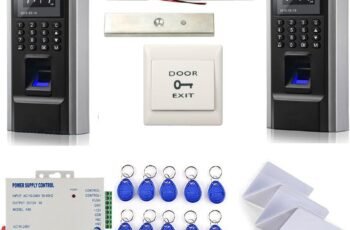
?Are we ready to evaluate whether the US-INBIO-260-PRO – Two-Door Pro Series Biometric Access Control Panel meets our security and deployment needs?

Product Overview
We want to summarize what the US-INBIO-260-PRO – Two-Door Pro Series Biometric Access Control Panel does and why it might matter for our site. This panel controls two doors and supports up to four readers, making it a solid middle-ground option for organizations that need biometric-level access control without committing to a larger multi-door controller.
Key Specifications
We’ll list the core specifications so we can quickly reference capability, compatibility, and connectivity. This table breaks down the most important technical points and helps us compare against other options at a glance.
| Category | Specification |
|---|---|
| Product Name | US-INBIO-260-PRO – Two-Door Pro Series Biometric Access Control Panel |
| Doors Controlled | 2 doors |
| Reader Support | Up to 4 readers (in/out configuration) |
| Compatible Readers | Pro Series standalone biometric readers |
| Software Integration | ZKBioSecurity |
| Third-Party Integration | Video surveillance, elevator control, and more |
| Communication | TCP/IP, RS-485 |
| Advanced Features | Anti-passback, multi-door interlock, time zones |
| Ideal Environments | Commercial buildings, campuses, high-security sites |
| Scalability | Scalable architecture for growth |
What’s Included and Packaging
We like to know what arrives in the box so we can plan installation and inventory. The package typically includes the control panel and basic mounting hardware, but we’ll want to confirm whether readers, power supplies, cables, and batteries are bundled or ordered separately.
Design and Hardware
We need to assess the physical and electrical design to understand suitability for various installations. The US-INBIO-260-PRO has a compact footprint with a rack- or wall-mountable enclosure suitable for IDF closets or secure equipment rooms.
Physical Build and Form Factor
We appreciate robust enclosures for controllers that will be in service for years, and the US-INBIO-260-PRO offers metal housing and a clean layout internally. The connectors for readers, locks, inputs, and outputs are clearly labeled, which helps reduce installation errors and speeds up commissioning.
Connectivity Options and Ports
We want flexible connectivity to fit diverse network architectures, and this panel supports both TCP/IP and RS-485 communication methods. That dual connectivity allows us to place the controller on an IP network or as part of a serial bus for legacy or distributed systems.
Features and Capabilities
We should examine the standout features to determine real-world applicability and how they map to our security policy. This unit combines biometric reader support, advanced access rules, and integration points for broader security ecosystems.
Reader Support and Configurations
We value diverse reader topologies, and the US-INBIO-260-PRO can handle up to four readers in an in/out configuration on two doors. That means we can add both biometric and card-based readers at the same door for multi-factor options or have dedicated entry and exit readers per door.
Software Integration with ZKBioSecurity
We like centralized management, and the panel integrates with ZKBioSecurity for unified user, policy, and event management. Through ZKBioSecurity we can push configurations, manage credentials, and review logs, which streamlines administration for multi-site or multi-panel deployments.
Advanced Access Control Features
We expect enterprise features from a pro-series controller, and this model includes anti-passback, multi-door interlock, and configurable time zones. These features let us enforce sequence rules, prevent tailgating through interlocking doors, and create complex schedules to match our operational hours.
Installation and Setup
We must understand the practical steps for deployment and how much pre-planning is required. Installation is straightforward for teams with access control experience, but we’ll outline what to expect for wiring, network setup, and initial configuration.
Network Deployment and IP Configuration
We prefer flexibility in network design, and because the panel supports TCP/IP, we can place it on a routed network or VLAN dedicated to security devices. Static IPs or DHCP can typically be used depending on our network policy, and RS-485 gives us an option for connecting to a controller bus when IP access is limited.
Wiring, Power, and Door Configurations
We need to map data, lock power, auxiliary inputs, and outputs properly; wiring diagrams in the manual help but we’ll plan wire runs carefully to avoid signal loss and interference. Power can be supplied through a dedicated power supply; for failover designs we’ll consider backup batteries and supervised power circuits to meet availability requirements.
Initial Configuration with ZKBioSecurity
We want to get a basic configuration live quickly, and pairing the panel with ZKBioSecurity typically involves registering the controller, setting door parameters, and provisioning readers. Once the panel is visible in the software we can import users or link it to our directory services if integrated, and test all authentication paths.
Integration and Compatibility
We need controllers that work as part of a larger security ecosystem, and this product supports third-party integrations such as cameras and elevator systems. That interoperability allows us to use the panel as a hub for coordinated security responses.
Third-Party Systems and APIs
We prefer open integration points, and the panel’s compatibility with common surveillance and elevator systems helps unify incident response and audit trails. Vendors often provide SDKs or modules in ZKBioSecurity to facilitate event-triggered recordings or door-triggered elevator recalls.
Elevator Control and Video Surveillance Integration
We want to constrain vertical movement and correlate access events with video evidence, and the US-INBIO-260-PRO supports elevator control integration and camera system links. When a user authenticates to a floor or a door alarm occurs, we can automatically send commands or mark video clips to speed incident resolution.
Security and Performance
We should evaluate the security posture and expected reliability under load, since controllers are critical infrastructure. The US-INBIO-260-PRO was designed with enterprise features to reduce common attack vectors and ensure consistent uptime.
Authentication, Anti-Passback, and Credential Handling
We prefer controllers that enforce credential policies, and anti-passback helps prevent credential sharing or credential misuse in high-traffic areas. The panel leverages biometric readers and supports card readers for multi-factor setups, limiting the efficacy of stolen or cloned credentials.
Multi-Door Interlock and Time Zone Policies
We want to control traffic through sequences of doors and schedule access according to timed policies, and the multi-door interlock plus time zones provide that control. Interlocks can prevent both doors of an airlock from being opened simultaneously, and time zones allow granular schedule enforcement for different user groups.
Reliability, Redundancy, and Performance Under Load
We need controllers that remain stable under continuous use and during network interruptions, and the US-INBIO-260-PRO offers features to ensure local decision-making continues when central systems are offline. For redundancy we can design network failover and consider redundant servers for ZKBioSecurity to minimize single points of failure.
Use Cases and Environments
We want to map the product to specific real-world locations to determine fit, and typical deployments include commercial buildings, campuses, and secure facilities. The panel’s mix of scalability, biometric support, and integration capabilities makes it suitable for environments that prioritize identification accuracy and interoperability.
Commercial Buildings and Offices
We expect strong identity assurance in corporate settings, and this panel supports multi-factor approaches and centralized policy management to control tenant or employee access. Integration with video and building systems can also improve safety and streamline facility operations.
Campuses, Labs, and Educational Institutions
We need flexible scheduling and zoned access in campus environments, and time zones and role-based policies help manage students, staff, and visitors effectively. Biometric readers reduce credential handling and can be used in labs where strict access control is required.
High-Security Sites and Critical Infrastructure
We must minimize unauthorized entry in high-security settings, and biometric authentication combined with anti-passback and interlocks raises the bar for attackers. Integration with elevator controls and surveillance systems further allows us to coordinate responses and restrict movement dynamically.
Scalability and Future-Proofing
We should confirm whether the system will support growth without major replacements, and this Pro Series controller is designed for expansion through additional panels and centralized software. That means we can start small and scale to cover more doors and sites while maintaining consistent policies.
Adding Doors and Readers Over Time
We like modular systems that let us add capacity, and while this unit is a two-door panel, we can deploy multiple units under the same ZKBioSecurity umbrella to cover larger footprints. This approach gives us predictable scaling: additional panels are integrated and managed centrally rather than requiring a single large controller up front.
Software Updates, Firmware, and Ecosystem Longevity
We prefer products with vendor support for updates and ecosystem growth, and the Pro Series generally receives firmware updates and new integrations through ZKBioSecurity. Keeping firmware and management software current ensures compatibility with newer readers, improved security patches, and new features.
Pros and Cons
We should balance strengths and trade-offs to decide if this fits our budget and operational model. The US-INBIO-260-PRO provides robust features in a compact controller but requires planning for power, network design, and potential licensing for advanced software modules.
Pros
We like that it supports biometric readers and up to four readers per two doors, enabling multi-factor deployments and flexible in/out configurations. The integration with ZKBioSecurity and third-party systems provides centralized control and expanded capabilities for surveillance and elevator management.
Cons
We need to be mindful that this is a two-door controller, so larger sites will require multiple panels, which increases component count and installation complexity. There may also be licensing or module costs associated with advanced integrations or premium software features, so we’ll factor TCO into procurement decisions.
Comparison with Alternatives
We often benchmark products to ensure we choose the best fit, and comparing this panel against standalone reader systems and cloud-based controllers reveals trade-offs in local control vs. cloud convenience. The US-INBIO-260-PRO emphasizes local control with strong integration options, whereas cloud-first systems may simplify remote management but can limit certain integrations or local decision-making.
Standalone Readers Versus Centralized Panels
We prefer centralized panels for consistent policy enforcement and event correlation, and this product integrates with centralized software to achieve that. Standalone readers can work for small deployments but lack coordinated interlock, sophisticated anti-passback, and multi-door sequencing that a panel like this enables.
Competitive Offerings and Market Position
We aim to understand market alternatives, and this Pro Series sits in the mid- to high-tier range, competing with other biometric-capable controllers that offer similar integrations. We’ll choose based on integration requirements, existing infrastructure compatibility, vendor support, and total cost of ownership.
Deployment Best Practices
We should follow proven approaches to ensure reliable operation and secure configurations; planning wiring, network segmentation, and user enrollment workflows pays dividends over time. Below we outline practical recommendations we can adopt for consistent and secure deployments.
Network Architecture Recommendations
We favor isolating access control devices on a secured VLAN with ACLs to restrict traffic to management consoles and authorized systems. Leveraging static IP assignments or reserved DHCP leases simplifies long-term management and troubleshooting, and employing network monitoring helps detect unusual device behaviors early.
Physical Installation Tips and Cabling Considerations
We should plan cable runs to minimize signal interference, using shielded cables where needed and keeping power and data runs separated to reduce noise. Lock power must be sized correctly for fail-secure or fail-safe configurations, and using supervised inputs for door contacts and tamper switches increases event fidelity.
Operational Policies and User Management
We expect consistent policy enforcement and recommend defining role-based access templates, lifecycle policies for credential issuance and revocation, and periodic audits of activity. Enforcing biometric enrollment quality standards at onboarding reduces false rejects and improves day-to-day throughput.
Maintenance and Troubleshooting
We’ll need a plan for routine checks, firmware updates, and common failure modes to keep the system healthy. Proactive maintenance and a clear troubleshooting flow help reduce downtime and ensure that access control continues to meet our security objectives.
Routine Maintenance Tasks
We should schedule periodic firmware and software updates, inspect physical hardware for wear or environmental issues, and validate backup power systems regularly. Cleaning biometric reader surfaces, verifying door contacts, and testing lock functions on schedule will keep the system reliable.
Troubleshooting Common Issues
We often encounter network misconfigurations, power problems, and reader enrollment errors; checking logs in ZKBioSecurity and the panel’s local logs usually points us to the root cause. For reader errors we’ll verify cabling, reader firmware, and enrollment data integrity before replacing hardware.
Support, Warranty, and Vendor Resources
We prefer vendors that provide detailed documentation, firmware support, and responsive technical assistance; we’ll confirm warranty terms and support channels before purchase. ZKTeco’s ecosystem typically includes knowledge bases and professional services for complex integrations, which can be helpful during large deployments.
Practical Scenarios and Deployment Examples
We like to review concrete scenarios to visualize how a product performs in real life, and the US-INBIO-260-PRO is suited for a variety of deployments from small corporate sites to multi-building campuses. We’ll outline a few typical deployments and how we might configure the panel in each.
Small Corporate Office with Two Secure Entrances
We might use the panel to manage two main points of entry, each with both an entry and exit reader to support accurate tracking and anti-passback. Time zones can lock down after-hours access, while integration with cameras allows for automatic recording of suspicious access attempts.
Research Lab with Airlock Requirements
For labs that require interlocked doors, we’ll configure multi-door interlock so that when the first door opens the second remains locked until the sequence completes. Biometric readers reduce the risk of credential copying and improve identity assurance for personnel requiring access to sensitive areas.
Multi-Building Campus Expansion Plan
If we plan to scale across buildings, we’ll deploy multiple US-INBIO-260-PRO panels and manage them centrally through ZKBioSecurity. Elevator integration in key buildings ensures that only authorized users can access certain floors, and centralized logs help with incident correlation across the campus.

Cost Considerations and Total Cost of Ownership
We should balance upfront hardware cost with installation, software licensing, training, and maintenance to understand lifetime expense. While the panel offers rich features, we’ll budget for readers, power supplies, network gear, software licenses, and labor as part of procurement.
Upfront and Recurring Costs
We’ll account for controller hardware, biometric readers (if not included), cabling, enclosures, locks, and installation labor upfront. Recurring costs may include software licenses for ZKBioSecurity modules, support contracts, and periodic maintenance.
Cost-Benefit Analysis
We should weigh the benefits of reduced credential misuse, streamlined audits, and improved incident response against the total costs, and in many cases the biometric and integration advantages justify the investment. The ability to scale and reuse software investments across panels often improves cost efficiency over time.
Final Recommendation
We want a concise decision statement that helps our procurement and security teams move forward, and this section summarizes fit and next steps. After assessing features, integrations, and operational aspects, we’ll recommend when the US-INBIO-260-PRO is the appropriate choice for our organization.
Who Should Choose the US-INBIO-260-PRO
We recommend this controller for organizations that require biometric authentication, multi-factor support, and robust integrations with video and building systems. It’s particularly well-suited to commercial properties, campuses, labs, or any environment where local decision-making and sophisticated access policies are required.
Summary Statement and Next Steps
We find the US-INBIO-260-PRO to be a flexible and powerful two-door controller that balances biometric capabilities, advanced access policies, and integration potential. Our next steps would be to pilot the controller in a representative location, validate integrations with our VMS and elevator control systems, and finalize licensing and support arrangements before full roll-out.
If we move forward, we’ll prepare a deployment checklist, bill of materials, and a test plan to measure peak performance, enrollment throughput, and integration behaviors. We can also draft an RFP template referencing the key requirements we’ve outlined so we can compare proposals from resellers and integrators effectively.
Disclosure: As an Amazon Associate, I earn from qualifying purchases.